gBurner Pro for Windows is professional disc-burning and image-management software that makes it easy to create, copy, and manage optical media. It meets the need for a reliable tool for burning data, audio, and video discs, creating bootable media, and processing disk images with ease. The portable build enables technicians and power users to execute the software from external storage while maintaining host systems. gBurner Pro simplifies disc creation and virtual-image chores for both casual and advanced users by supporting a wide range of formats, automatically detecting images, and providing handy workflow features.
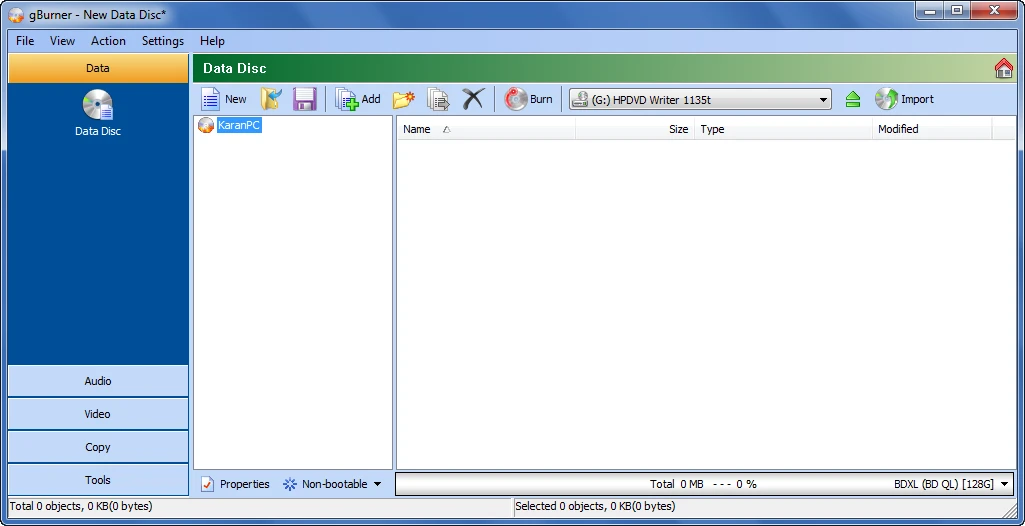
Key Features of gBurner Pro:
- Create Data/Audio/Video Discs: Burn CDs, DVDs, and Blu-ray discs in a variety of formats (CD-R, DVD-R, and BD-R), with dependable writing and session support.
- Multisession Disc Support: Add new data to existing discs between sessions, allowing for incremental backups and flexible disc content modifications without re-burning the entire media.
- Create bootable data CDs and DVDs for OS installation or recovery tools, ready to boot and diagnose the system.
- Disc Copying: Sector-level copying lets you quickly duplicate CDs, DVDs, and Blu-ray discs while preserving boot data and disc structure.
- Wipe Rewritable Discs: You can securely wipe CD-RW, DVD-RW, and BD-RE media to prepare them for reuse or permanently erase sensitive data.
- Bootable USB Drive: Make bootable USB drives from images or discs to install or run systems from USB storage on compatible computers.
- Open, generate, edit, extract, convert, and burn ISO, BIN, and other image formats for smooth image management.
- Extensive Image Format Support: The software automatically identifies and handles ISO, BIN, CUE, MDF, IMG, DAA, UIF, NRG, DMG, and many other formats.
- Support for virtual disks and partitions includes WIM, VMDK, VHD, and VDI images, as well as disk images with FAT, NTFS, or EXT partitions.
- Unicode, Audio, and Optimisation: Supports Unicode filenames, multiple audio formats (MP3, WMA, WAV, FLAC), context menu integration, and file layout optimization to save disk space.
Why Choose gBurner Pro?
gBurner Pro blends user-friendliness with professional-grade capabilities, providing robust image handling and diverse burning tools in a lightweight package. Its automatic picture detection and extensive format coverage alleviate compatibility issues, while bootable media creation and multisession capabilities make installation and backup procedures easier. The portable edition lets you use gBurner Pro without installing it, which is great for technicians who need mobility. Overall, it offers steady performance, a simple UI, and excellent disc-space optimization for both casual users and technical pros.
Advantages of gBurner Pro Portable Edition.
The portable edition requires no installation and does not modify the Windows registry, enabling secure cross-machine use. Carry gBurner Pro on an external drive and use it to generate, edit, or burn images without affecting the host system or leaving configuration traces.