EZ Meta Tag Editor 12.3.4.1 Edit Audio Metadata with Ease


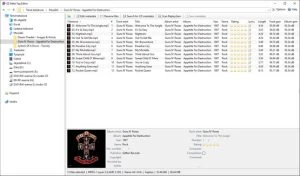
Is your digital music library a disorganized mass of untagged files and missing album art? With its user-friendly Windows File Explorer interface, EZ Meta Tag Editor organizes and clarifies!
EZ Meta Tag Editor is commonly used to easily organize your audio collection, edit audio file tags, find high-resolution cover art, and add ReplayGain information to audio files for consistent loudness during playback.
Are you ready to take charge of your audio files and improve your musical experience? Download EZ Meta Tag Editor now! Easily manage your music library, correct metadata errors, and rediscover the delight of a well-organized digital collection.
Features of the EZ Meta Tag Editor
- Obtain metadata from six online metadata services.
- Cover art search from GD3, MusicBrainz, Discogs, and Amazon.
- Manual metadata search using GD3, MusicBrainz, and Discogs.
- Enhanced metadata editor to modify all metadata tags and add new metadata.
- Supports cover art and other inserted images.
- Full metadata support.
Supported audio file formats
AAC, HE-AAC, AIFF, Monkey’s Audio, DSF, DFF, FLAC, MP3, MP2, MP1, Musepack, Opus, True Audio (TTA), WAV, Wavpack, WMA, and Vorbis
3g2, 3ga, 3gp, aac, aif, aiff, ape, asf, dsf, dff, flac, mp1, mp2, mp3, mp4, mpc, ogg, opus, tta, wav, wma, wmv, wv
ReplayGain uses EBU R128 loudness metering for optimal accuracy (ReplayGain 2).
Internet disc databases
GD3, MusicBrainz, Windows Media Player/Gracenote, Discogs, FreeDB, and Amazon
Portable EZ Meta Tag Editor.
The Portable EZ Meta Tag Editor allows you to manage audio metadata on the go. Run it from a USB drive to edit and organise audio files at any time, from any location, keeping your music library well-maintained and properly classified.