CPUID PowerMAX 2019 is a program that tests the burn-in and stability of the CPU and GPU.
This application is appropriate for users who overclock their CPUs and want to see if their cooling system is adequate, or if the PSU they are using can handle the power supply to the CPU as required. We can utilize the powerMAX program to ensure that the job is stable. Energy Consumption: Heat is produced when running the full CPU, which can be tested on both the CPU and the GPU. The CPU has two command set options: AVX and SSE. In terms of graphics (GPU), we can control the level of intensity during the test. Changing the resolution (display resolution) utilized in testing
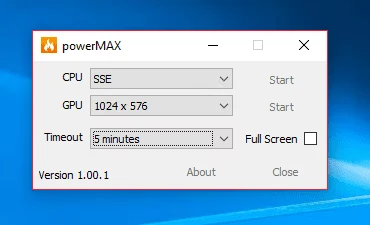
powerMAX has 3 main testing modes:
CPU Test: Check CPU stability (as in the case of overclocking) and see if CPU cooling works properly
GPU test: same, but for GPUs
Testing the CPU and GPU at the same time maximizes power consumption for the full system and ensures that the PSU can simultaneously manage the maximum power required by the CPU and GPU.
Testing with powerMAX is not only a direct burn-in test of the CPU and graphics. It is also a test of the efficiency of the Power Supply (PSU) because, during the burn-in test, more power will be drawn from the power supply than usual.
Note:
- PowerMAX does not use benchmark programs, so there is no performance score or stability score provided
- To test the CPU and GPU simultaneously, it may be noticed that the CPU Power and heat values are lower than those of the CPU test alone. This is because part of the CPU Power tests the GPU. The more powerful the CPU, the better. The fewer side effects you will notice