WinCatalog 2026 is a powerful file indexing and cataloging tool designed for users who manage large collections of files, folders, disks, and external drives. Instead of manually browsing through countless directories or searching multiple locations, WinCatalog builds a smart index of everything you own, giving you instant access to any item whenever you need it. This makes it especially useful for people who work with massive archives, CD/DVD collections, removable drives, and project libraries.
The software automatically reads file attributes, previews contents, and keeps track of paths, sizes, and creation dates — even if the original media is no longer connected. This means you can browse your entire collection offline and still know exactly where everything is. The interface is clean and beginner-friendly, allowing new users to organize catalogs without confusion.
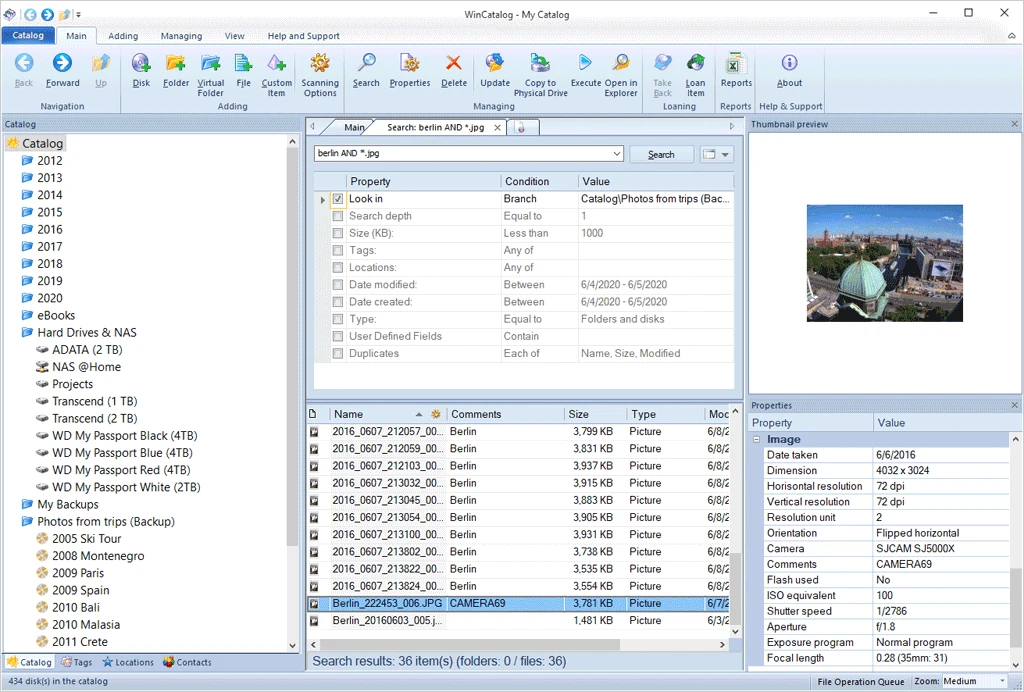
What sets WinCatalog 2026 apart is its advanced search engine. You can locate any file by name, tag, date, size, location, or custom filter. With multi-tab searching, duplicate file detection, virtual folders, and loan management tools, the program handles everything from archiving documents to tracking borrowed disks.
Overall, WinCatalog 2026 is a complete and efficient solution for users who want faster searching, cleaner organization, and a smarter way to manage large data collections.
WinCatalog 2026 Full Features
- Ability to catalog any storage devices accessible from the Windows environment.
- Ability to catalog individual folders on disks.
- Automatic extraction of archive file descriptions when scanning a disk.
- Automatic extraction of EXIF tags from digital photographs.
- Track names for audio CDs are retrieved from the Internet CD database.
- Support for non-file items enables you to catalog your books, videos, and even postage stamps and coins!
- Individual comments for each item: disk, folder, or file.
- Ability to manage your collection between virtual folders using Drag’n’Drop.
- Each item is associated with a set of keywords to improve search relevance.
- File name, comment, keywords, date, and size can be searched in the catalog.
- Powerful search functionality: ability to use AND, NOT, OR operators and wildcards.
- Ability to search the entire catalog or an individual disk.
- When the disk data is updated, the previously entered comments and keywords are preserved.
- Ability to delete unnecessary files and folders from the catalog.
- Ability to export and import parts of the collection and the list of contacts.
- The capacity to produce reports.
- Ability to generate HTML reports for sending to someone, publishing on the Web, or printing.
- Ability to export any folder to a CSV file (comma-separated values) for opening the catalog in MS Excel or other applications.
- Ability to automatically open the last catalog when the application is started.
- interface with multiple languages.
Portable Version of WinCatalog
You can manage and view indexed files without installing WinCatalog Portable. Keep it on a USB drive and access your entire catalog on any Windows PC, making it perfect for users who work with external drives or multiple systems.
Obtain WinCatalog 2026 Right Now
If you need a fast, organized way to manage large collections of files, disks, and folders, WinCatalog 2024 is the ideal choice. Its indexing engine, advanced search filters, and easy catalog management make finding documents incredibly simple.
Click the button below to save the latest version for your Windows PC and organize your files with powerful search and catalog tools.