Are you looking for a reliable way to recover lost data from your iPhone, iPad, or iPod touch? Say welcome to MobiKin Doctor for iOS, the go-to tool for trouble-free data recovery on Windows. Whether you’re a busy professional, a diligent student, or simply a regular user, MobiKin Doctor for iOS has you covered with its extensive capabilities. This sophisticated program can easily retrieve lost contacts, photographs, messages, and other data from your device or iTunes backups. Imagine not having to worry about unintentional deletions or unexpected data loss again!
MobiKin Doctor, designed for both IT novices and specialists, simplifies the recovery procedure, allowing you to restore your important data fast and easily. Furthermore, the user-friendly interface makes data recovery more straightforward than ever before.
Don’t wait until it’s too late; secure your vital data now. Get MobiKin Doctor for iOS from the developer’s website and take charge of your digital life!
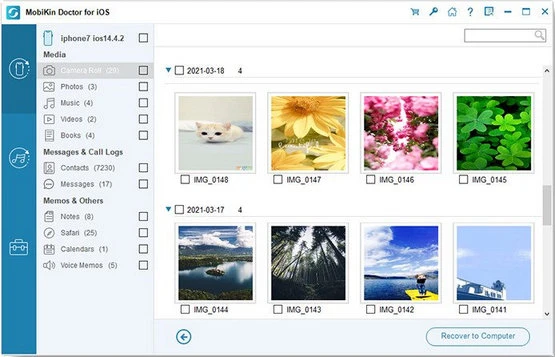
Features of MobiKin Doctor for iOS:
Multiple recovery modes allow for flexible data restoration.
Data loss occurs intermittently in portable digital life. As a result, we strongly advise you to utilize Doctor for iOS, an all-in-one iPhone data recovery software, as your daily assistant. It offers consumers three distinct iPhone recovery solutions for restoring deleted and lost data from their iOS devices.
- Recover data from iPhone directly: Scan your iPhone, iPad, or iPod touch to recover lost or deleted files.
- Restore iPhone from iTunes backup: The software will automatically scan all iTunes backup files on the computer and extract any data from the backup file to recover selected contents.
- Restore iPhone from iCloud backup[Coming soon]: Log in to your iCloud account, and you can preview and recover your desired data by extracting it from an iCloud backup.
Restore all file types at the highest speed.
Using this iPhone recovery program, you may recover almost any type of data from your iPhone, iPad, iPod touch, or iTunes backup. Before completing iPhone data recovery, a preview is available to help you make more informed decisions.
- Supported deleted files include contacts, messages, and message attachments. (Additional file types will be supported soon.)
- Existing files were supported, including Call Logs, Contacts, Messages, Message Attachments, Notes, Note Attachments, Safari, Safari History, Calendars, Reminders, Voice Memos, Camera Roll, and Photos.
- It has the highest iPhone recovery success rate, and if you have any problems with iOS data recovery, the support team is always available to assist.
Backup data from iOS devices to a local computer.
Once you begin scanning files on your iDevice with this iPhone recovery software, it will automatically scan both deleted and existing data on your iPhone, iPad, or iPod touch. Then you can choose and export them to your PC. As a result, this iPhone data recovery software may also serve as an effective iOS file backup program.
- Back up the full content of the iOS device in three easy steps: Scan – Select – Recover to PC.
- Convert the retrieved data into a readable format. For example, contacts are saved in CSV, HTML, and VCF formats, while SMS messages are saved in CSV or HTML formats. Other file types will be saved to the PC in their original format and quality.
- Extract data from unreadable iTunes backup files and save it to your local computer. However, please ensure that your iTunes backup is up to date and includes all of the necessary files.