DoYourClone is a Windows disk-cloning program that supports hard drives, solid-state drives, and USB drives. The developers claim that their program is the greatest of its kind, but in this case, everyone praises their own swamp.
Features:
- Its main virtue is its simplicity; most cloning tools are extremely complicated for the typical user, with numerous options and ambiguous parameters, and beginners sometimes give up before understanding them.
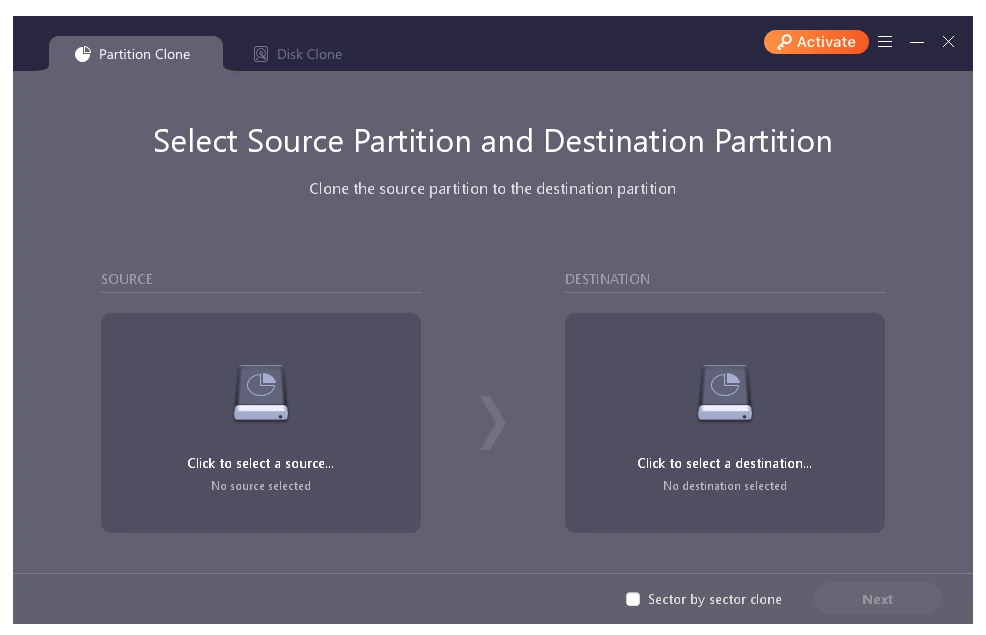
- The software has removed all unnecessary complexity and reduced the process to three steps: choose the source disk, choose the destination, click the button, and wait. Before you begin, you can change the partition structure on the destination disk if necessary, but you don’t have to; the application will do it for you.
- Once the cloning is complete, check the data on the new disk, and you’re done.
- According to the creators, all operations are performed in protected mode, ensuring that data on the source drive is not damaged throughout the process.
You can get DoYourClone for free below. The archive contains a crack for registration. A key may be included, but it is quite rare.
The application supports cloning the system disk, allowing you to move Windows to a fresh SSD and boot from it without reinstalling.
You should also note that, during cloning, the target drive must be at least as large as the source drive’s used space. This is not a program feature but rather a general cloning rule.
Macrium Reflect is a fantastic alternative, a serious tool with a lot of options. It can clone and create disk images. It is more powerful than DoYourClone, but also more complicated. Clonezilla, which is fully free and open source, runs on a bootable USB drive and requires no installation. It is extremely stable, although its interface is console-based.