This tool was intended for those who own an ASUS graphics card and want to configure and monitor all its parameters easily. You can download ASUS GPU Tweak using the links provided below.
ASUS GPU Tweak versions 2 and 3 are available at the URLs provided below. The program has a strong reputation in Russia and is extremely popular among users on our website and worldwide. Check its positive reviews, and everything will be evident.
The screenshots show that you can adjust all primary parameters, including memory and GPU clock speeds, as well as the fan speed. There is also a feature that lets you save settings and switch between them quickly—for example, you can set one configuration for one game and another for another.
I especially enjoyed the user interface; it appears trendy and aggressive, and it’s a pleasure to work with. There is also a mechanism that restores all settings to their prior values if you make an error.
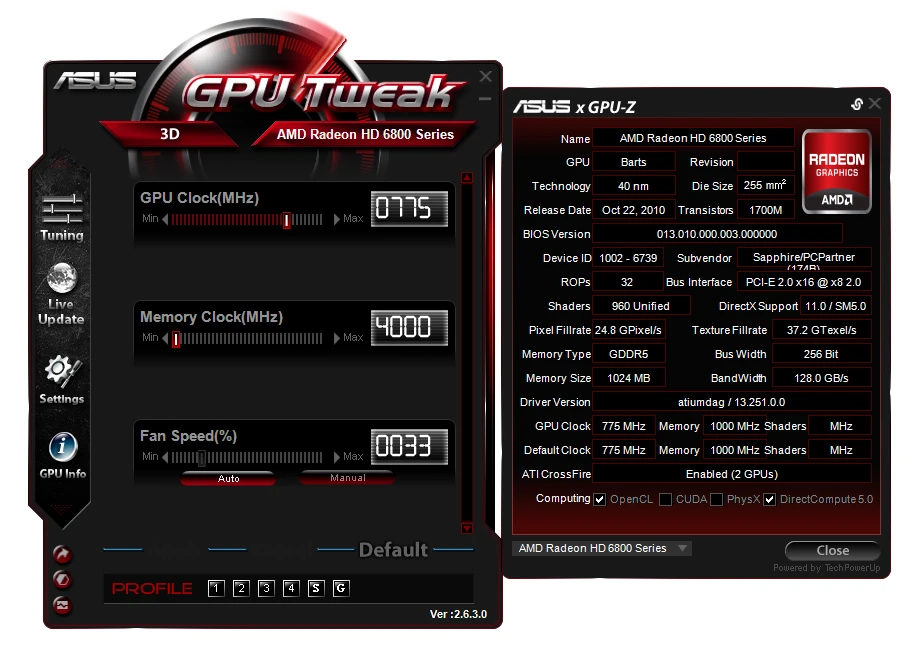
Asus GPU Tweak Features:
- The application can raise the GPU and video memory clock speeds.
- Easy voltage adjustment is required for aggressive overclocking or, conversely, underclocking.
- Convenient fan control with adjustable profiles.
- Real-time monitoring mode displays temperature, clock speeds, load, and other statistics.
- On-screen monitoring ensures that all metrics are visible even during games.
- Pre-made profiles, such as quiet mode with lower fan speeds or gaming mode with balanced settings.
- Ability to save your own profiles.
- Power Limit Adjustment
- Screen refresh rate setting.
- Strong integration with other ASUS utilities.
- Option to start automatically with Windows
- Some versions allow changing the card’s firmware.