NWinfo is an interesting tool that may display a lot of information about your computer’s hardware. It is intended for anyone who wants to understand what is going on inside the system unit.
This application has two modes: the first, which requires the command line, is for computer professionals, and the second, which uses a conventional graphical interface, is for casual users like myself. I tried both versions; the command-line interface contains a wealth of information that may not be of interest to many people, so for the ordinary user, it is conveniently presented graphically.
NWinfo can tell you the installed operating system version, how long the computer has been running without a reset, and the username. You can also see information on the BIOS, processor, RAM, hard disks, network drives, and more.
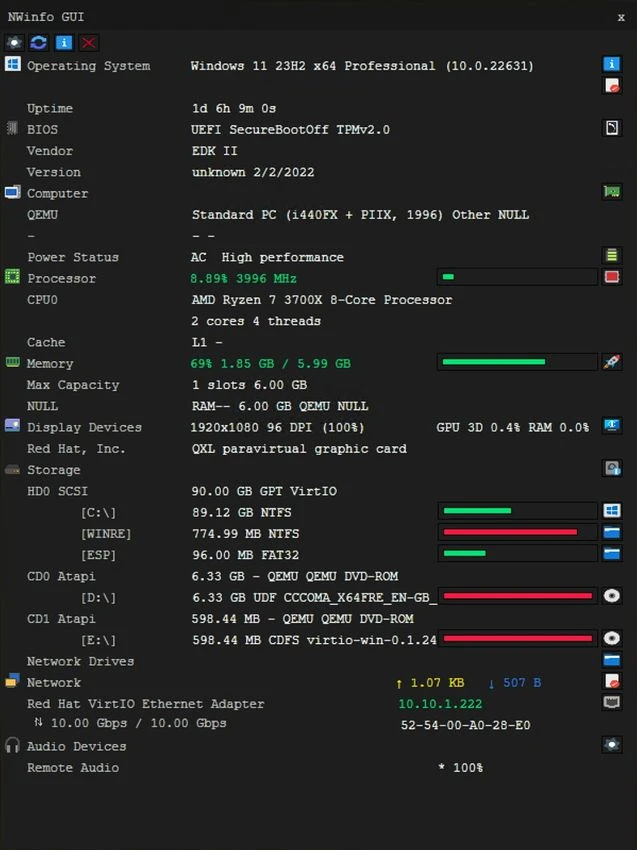
NWinfo allows you to monitor your computer’s performance in real time, displaying CPU load, memory usage, and disk activity. Overall, it’s conventional but more convenient than its competitors, which, while an acquired taste, isn’t too horrible.
Here’s a sound system-monitoring utility that displays extensive information about critical computer components. It’s an excellent option for folks who want to learn more about their system without being a tech expert. Its main advantage is ease of usage.