Do you need to increase your PC’s sound capabilities? Realtek High Definition Audio Drivers support the latest audio formats, giving high-quality, multi-channel sound experiences such as DTS, Dolby, and Surround.
These drivers provide considerable advantages over earlier AC’97 audio, including full support for new codecs, increased bandwidth, Plug & Play device connection, and enhanced speech recognition. Experience theater-quality audio in your own home. Download Realtek High Definition Audio Drivers today and maximize your PC’s audio performance!
Have you updated your Realtek driver? Please share your experience and any audio enhancements in the comments!
Key Features of Realtek High Definition Audio Drivers:
High-performance DACs and ADCs.
Realtek drivers include high-performance Digital-to-Analog Converters (DACs) and Analog-to-Digital Converters (ADCs), which provide superb audio quality and a dynamic range of up to 106dB.
7.1+2 Channel Multi-streaming
Experience immersive 7.1 surround sound while also streaming stereo audio for gaming, VoIP, and other apps.
Broad Sample Rate Support
Supports 44.1k, 48k, 96k, and 192kHz sample rates for both playback and recording, providing high-quality audio.
Microphone Array Input with AEC/BF
Advanced Acoustic Echo Cancellation (AEC) and Beam Forming (BF) technologies improve sound quality during calls and recordings.
Enhanced Gaming Experience
Realtek drivers enhance your gaming experience by emulating 26 sound environments and providing 3D positional audio.
User-Friendly Interface.
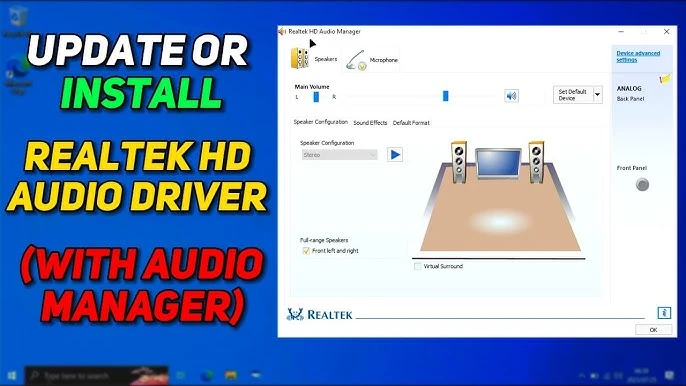
You may easily change your audio settings using the simple configuration interface and Realtek Media Player.
Compatible with Windows 10 and 11.
These drivers are designed to integrate perfectly with Windows 10 and 11, ensuring smooth performance and quick installation.
Why Use Realtek High Definition Audio Drivers for Windows?
Realtek High Definition Audio Drivers are known for their exceptional audio quality, extensive feature set, and compatibility with a wide range of devices. Unlike generic audio drivers, Realtek offers advanced features such as multi-streaming, 3D positional audio, and microphone-array compatibility, making it an excellent choice for both casual users and audiophiles.
How To Use Realtek High Definition Audio Drivers
Step 1: Download the drivers.
Visit the Realtek website and download the most recent version of the High Definition Audio Drivers for your Windows version.
Step 2: Install the drivers.
Run the installer and follow the on-screen directions to finish the installation.
Step 3: Adjust audio settings.
Open the Realtek Audio Manager from the system tray to tailor audio output, input, and effects to your liking.
Step 4: Test your audio.
Play music, watch a video, or test your microphone to confirm everything is operating correctly.
Realtek High Definition Audio Drivers vs Other Tools
While other audio drivers are available, Realtek stands out for its enhanced capabilities and reliability. Unlike generic drivers, Realtek enables high sample rates, multi-streaming, and 3D audio, resulting in a better listening experience. Furthermore, its user-friendly interface and compatibility with a wide range of hardware make it a popular choice among Windows users.
Frequently asked questions (FAQs)
What is the purpose of Realtek High Definition Audio Drivers?
These drivers improve your PC’s audio performance by enabling high-quality sound output and input for music, movies, gaming, and other applications.
Are Realtek’s drivers compatible with Windows 10?
Yes, the Realtek High Definition Audio Drivers are entirely compatible with Windows 10.
Can I use Realtek drivers for gaming?
Absolutely! Realtek drivers include 3D positional audio and sound environment emulation, making them ideal for gaming.
How do I update the Realtek drivers?
Visit the Realtek website, download the most recent version, then follow the installation instructions.
Do Realtek’s drivers support surround sound?
Yes, Realtek drivers support 7.1 surround sound, providing an immersive audio experience.
Final Thoughts
Realtek High Definition Audio Drivers are a game-changer for anyone trying to improve their audio performance under Windows. These drivers are essential for your PC because they provide advanced capabilities, flawless compatibility, and outstanding sound quality. Don’t settle for substandard audio; download Realtek High Definition Audio Drivers today to maximize the performance of your sound system!