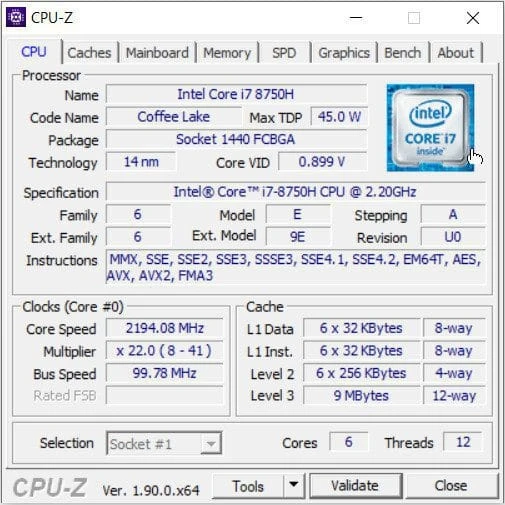
Download the most recent portable version of CPUID CPU-Z 2026. This free, no-install tool lets you view your computer’s and laptop’s specifications, as well as precise CPU information.
What is CPU-Z?
CPU-Z is one of the most effective applications for verifying computer specifications. It’s a free tool that collects data about the major system components. It can search for and display detailed information on your computer’s hardware, including the CPU, memory, motherboard, and RAM. Each physical component has its own tab, making navigation simple. Its applications are numerous; for example, if you wish to replace or add RAM, you may verify the model of your current RAM and purchase the appropriate model. It can also be used to monitor system stability when changing the speed and core voltage (CPU power supply) during overclocking, since it is critical to keep track of each hardware component’s temperature.
The features of CPU-Z.
- This detects which CPU your computer is using and displays information about it, including a symbol representing that CPU.
- Check your CPU’s L1, L2, and L3 cache sizes.
- Check which motherboard model your machine is using.
- Check the amount of RAM on your computer, the RAM bus speed, and the number of modules that can be installed.
- Check the graphics card model you’re using.
What’s New
- AMD Ryzen 7 9850X3D (Granit Ridge).
- AMD Ryzen 5 7500X3D (Raphael).
- AMD Medusa Point is currently receiving preliminary support.
- Intel Core Ultra 9 290K Plus, Ultra 7 270K Plus, and Ultra 5 250K Plus processors (Arrow Lake Refresh).
- Improved support for LPDDR5X CAMM2.