ASCOMP Screencapt Pro is a sophisticated screen capture program suitable for both home and professional use. It includes a variety of capabilities for recording, editing, and saving screenshots, making it a valuable tool for users who need to create high-quality screenshots.
ASCOMP Screencapt Pro offers versatile photographic possibilities.
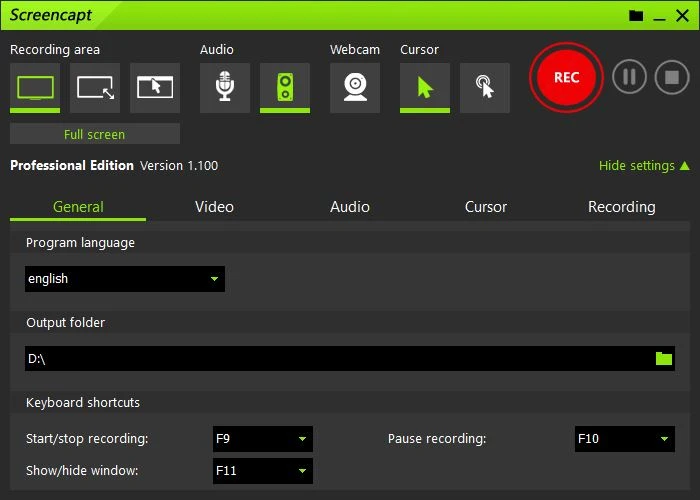
Full Screen Capture: This feature captures the entire screen, including any multiple displays.
Area Capture: Users can capture particular areas of the screen to focus on specific material.
Window Capture: Record the contents of a single window, such as a browser or program window.
Scrolling Capture is ideal for capturing long web pages or documents that exceed the screen’s visible area.
Editing Tools:
Annotations: Users can add text, arrows, shapes, and highlights to screenshots to emphasize crucial details or directions.
Cropping and resizing: Built-in tools let you crop and resize photographs to highlight specific regions or change their dimensions.
Effects and filters: Use a variety of effects and filters to improve or transform the appearance of your screenshots.
File Management:
Saving options: You can save screenshots in a variety of formats, including PNG, JPEG, and BMP.
Organisation and Management: Provides options for organizing and managing screenshots, helping you keep track of multiple images.
Sharing & Exporting:
Direct sharing: Users can send screenshots via email or upload them to cloud storage services.
App integration: You can easily integrate with other apps or services to streamline workflows and sharing.
Customizable settings:
Hotkeys: Users can create custom keyboard shortcuts to take screenshots and increase efficiency quickly.
Adjust the recording delay, file-naming conventions, and default save locations to personalize the program to your specific needs.
User-friendly interface:
Intuitive design: The interface is straightforward to use, with options and controls that are accessible to both new and experienced users. Users can preview images and make edits before saving or sharing, ensuring the final result meets their requirements.
Uses
Professional Documentation:
Ideal for preparing documents or reports that require high levels of visual clarity and detail. Annotation and editing tools help to highlight important information.
For software and web development, screenshots can be taken to report bugs, build user interfaces, and give presentations.
Teachers and trainers can build teaching materials using annotated screenshots and step-by-step guidance.
Personal use: Users can capture and share screen moments for social media, personal archives, or casual communication.
Considerations
Performance: Ensure that the software is efficient, especially when working with large or multiple screenshots.
Compatibility: Make sure the software is compatible with your operating system and works well with other tools you use.
Feature set: Determine whether the available features fit your specific requirements, such as advanced editing tools or integration possibilities.
As a result.
In a nutshell, ASCOMP Screencapt Pro is a comprehensive screen capture application that meets a wide range of needs, from basic screenshots to advanced image editing and administration. The mix of broad capture choices, sophisticated editing capabilities, and a user-friendly interface makes it a valuable asset for anyone who frequently works with screenshots.