Download CapCut PC (x64) in Thai for free, a popular video editing program on notebook computers, easy to use, convenient features and tools. Complete in one program, direct link (Offline Installer), latest version
About CapCut PC
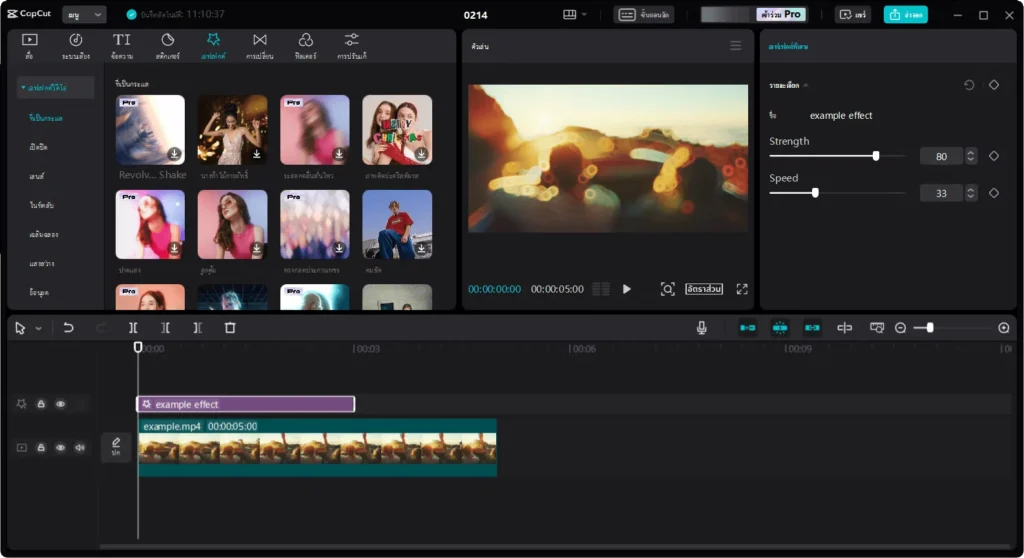
CapCut PC is a video editing program developed from the popular CapCut mobile phone application. Still, this PC version is designed to allow users to work more efficiently on their computers. For those who want beautiful and professional work, using it on a PC also helps increase performance and ease of control for those with experience using keyboards and mice. Whether you’re an entertainer, creator, or someone interested in creating multimedia content in various formats for social media sharing or personal use, CapCut for PC has comprehensive features and tools for video editing, such as basic editing, adding effects, Color and lighting customization, and more, that help create interesting and stylish videos happily and comfortably.
What CapCut PC can do
- Edit video: Videos can be edited using various flexible tools, such as cutting, copying, and pasting video clips. You can also upload videos in different formats and create still images from them.
- Customization: There are various customization tools, such as adjusting brightness, contrast, and color, adding interesting effects, basic sound, and accessing audio files within the program
- Filters and effects: Extensions of filters and effects help users create their own unique effects. Various options allow users to customize the style and presentation of the video.
- Template: There are templates to choose from to create videos. It allows you to start making videos quickly and easily.
- Keyframe Animation: Allows interesting movements to be created by determining the position and time of various keyframes.
- AI Beauty: Helps improve the facial image of the person in the video to look beautiful and interesting
- Multimedia: There is a feature that allows users to directly add basic audio, video clips, and still images to projects
- Sharing and Exporting: Created videos can be shared directly on multiple social media platforms or exported as video files in various formats.
- Working with long video clips: Can work with long videos without limitations to effectively cut and edit large videos.
CapCut for PC Highlights
- Free and easy to use: Make it an ideal tool for anyone who wants to work with video. Be it students, bloggers, or multimedia content creators
- Convenience of use on the computer: Using it on a PC makes it more efficient and convenient. This is because the keyboard and mouse can efficiently control and work with videos.
- Quality & Performance: It offers good quality in video and image editing. Its tools and features cover all user needs.
- Complete feature system: This software has features that cover all aspects of video editing, such as image editing, various effects, filters, and working with audio
- Flexibility in use: Flexible in use and customized according to user needs. This makes it possible to create stylish and interesting works.
- Support and updates: The development team continuously supports and updates it, ensuring that new and effective support and functions are always available.
CapCut is for whom
- Entertainers and Creators: It is an ideal tool for entertainers and creators who want to create high-quality and stylish video content
- Bloggers and content creators: These people create content for sharing on social media or blogs, such as video blogs, campaign videos, or online marketing content. This is because interesting and quality content requires tools and features.
- Students and students: It is a great tool for students who want to create a video project for a complete job. It has features that cover all aspects of video editing.
- Anyone who wants to make a video: No matter who you are, you can use CapCut because it has an easy-to-use interface and features that cover all video editing needs.