Tired of traversing endless folders? Actual File Folders is here to simplify your experience! This helpful plugin adds two extra icons to your Explorer windows, allowing you to quickly access your favorite and most recently used folders. Customize your favorite folders list with any directory path and adjust the history level to your preferences.
Actual File Folders is ideal for both casual and professional users, as it speeds up and improves file management efficiency.
Are you ready to simplify your workflow? Download and install Actual File Folders now. After you’ve tried it, please share your thoughts—was the review thorough, or did I overlook something? Begin exploring your files with ease today!
Features of Actual File Folders:
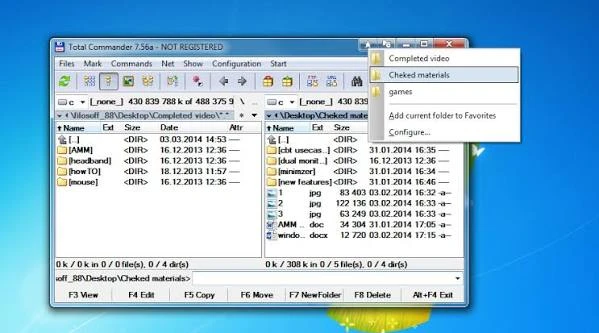
- The Favorite Folders panel allows you to manage your list of Favorite Folder shortcuts. Then, clicking the special title button will bring up this list. When enabled, this button will appear in the title bar of any compatible window.
- Because most Windows applications use system dialogs for tasks like opening files, saving files, and looking for folders, you can create a Favorite Folders list of shortcuts once and then use it in almost any program.
- Recent Folders is a file folders extension that automatically tracks which folders you have recently visited and saves a list of shortcuts to those folders so you may return to them with a single click. This is similar to your web browser’s browsing history: you can easily return to a web page you visited previously if necessary.
- Most file manager programs (including Windows Explorer) provide such a feature; however, the browsing history is only available while the window is open or within that specific file manager.
- Instead, Actual File Folders stores your browsing history worldwide, regardless of the program you used to access the folder. This implies that, for example, you can open a document in Microsoft Word from a different folder, then move to Microsoft Excel and return to the same folder using the Recent Folders history.
- The Recent Folders panel allows you to change the selections for Recent Folders. A list of recent folders can be accessed by clicking the special title button. When enabled, this button will appear in the title bar of any compatible window.
- Compact mode for title buttons now functions correctly on systems with right-to-left languages (such as Arabic or Hebrew).