Manually transcribing music lyrics or speech from audio recordings is extremely slow. VovSoft Audio to Lyrics Converter resolves this issue fast. This simple, lightweight Windows application automatically creates text transcripts from any audio file. Using offline AI models, the software “listens” to your recordings and properly extracts spoken or sung phrases, resulting in perfectly timed lyric or subtitle files. Because the AI works locally on your system, you do not require an internet connection or costly cloud API subscriptions. Your audio files are 100% confidential. Processing occurs immediately on your hardware. Fast, secure, and without recurring fees.
Features of VovSoft’s Audio to Lyrics Converter
- Wide Format Support: Compatible with popular audio formats such as MP3, WAV, OGG, and FLAC.
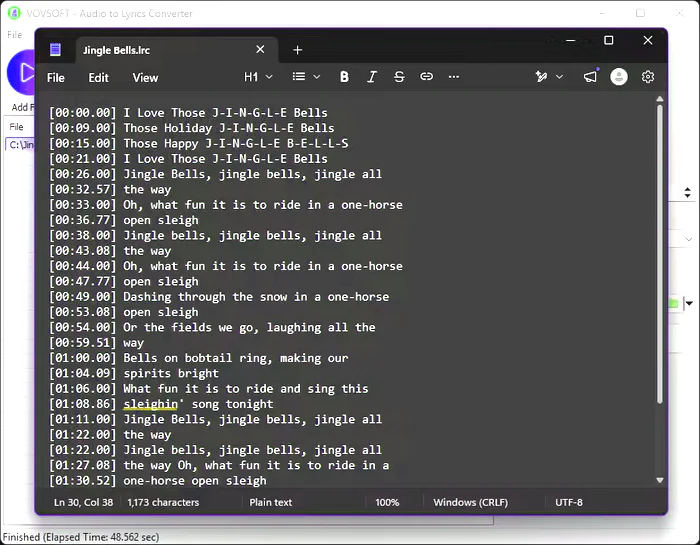
- Export your transcriptions in a variety of formats, including standard LRC files for music players, SRT or VTT files for video subtitles, and simple TXT files for easy reading.
- Offline AI Processing: Choose from a variety of local AI models (including the lightweight 465 MB model) to optimize conversion speed and transcription accuracy without relying on cloud servers.
- Batch Processing: To convert multiple audio files in a single operation, queue individual tracks or add entire folders.
- Synchronized Timestamps: Automatically creates precise timestamp tags (e.g., [00:26.00]) to ensure that your lyrics follow the audio track’s exact pace.
- Customizable Line Lengths: Set the maximum line length for the generated text to ensure your subtitles or lyrics fit perfectly on every screen size or media player.
- Drag-and-Drop Support: You can quickly load audio tracks by dragging and dropping files or directories into the software interface.
- Offline OpenAI Whisper: Runs strong, cutting-edge OpenAI Whisper models directly on your PC. No internet connection is required, so your audio files can be processed securely and confidentially.
Perfect for
- Creating LRC files for karaoke and digital music libraries.
- Creating automatic subtitles (SRT/VTT) for video footage.
- Transcribing podcasts, interviews, and lectures into plain text.
System requirements:
Windows 11 and Windows 10 (64-bit)