
ConfigureDefender – Sets antiviral settings for Windows 11 and prior versions. Keeping the built-in Defender is not recommended, but if you do, managing it using regular tools is inconvenient. Many functions are hidden in the registry and need advanced PowerShell instructions. This open-source program addresses all of these concerns with a user-friendly interface.
ConfigureDefender is free to download from the link provided below. This version is completely free, and no activation is necessary.
It does not require installation to function. The app organizes options into three logical categories: basic, SmartScreen filter, and Exploit Guard security. A concise list of changes to function status is located next to each menu item. Administrators can select security templates or manually enter specifications. You can easily limit CPU load or set a cloud service timeout.
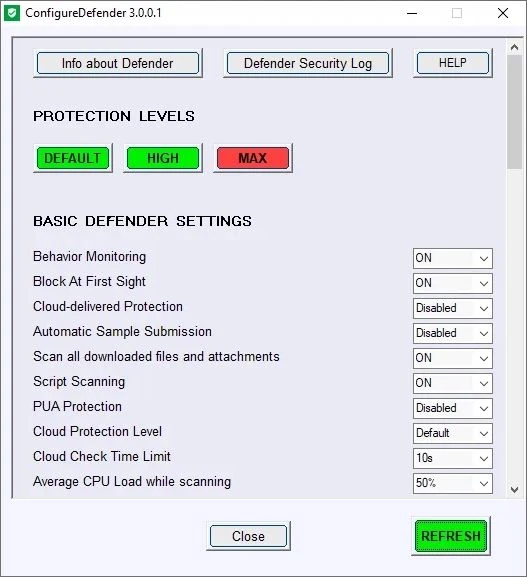
Program Features:
- Rapid activation of hidden system protection measures.
- Adjust the level of cloud file scanning on the fly.
- Features include network traffic filtering and download management, complete independence from Windows group policies, and user-friendly configuration profiles.
This software is appropriate for preventing undesirable applications from running. ConfigureDefender employs folder control methods to help keep infections from changing files. Overall, it’s a useful feature for low-end PCs, and it can significantly reduce Defender’s resource usage.
Responses to frequently requested questions:
Can I totally disable Defender?
Yes, the utility will assist in turning off the primary security monitoring components.
Do I have to keep the software running?
No, the software only modifies the existing system registry values.
Similar software:
Defender Control is a program for instantly turning off protection with one click.
O&O ShutUp10 is software that turns off telemetry and provides antivirus control options.