This easy tool lets you effortlessly administer a remote computer so that you can access another system from the comfort of your own home, for example. There are already leaders in this field, as I’ve mentioned multiple times on our project, but we won’t discuss them here. This development is also in high demand; thus, I recommend you download UltraVNC from our project.
The software connects locally or worldwide, and you can view the desktop of the other operating system you need to access. That’s it; we can start working on it. A mouse and keyboard are welcome, but there are no other options.
UltraVNC would appreciate it if you included some extras. You can, for example, improve privacy by enabling data encryption during transmission.
The interface is fine and does not cause any issues. To prevent unauthorized access, create a password when you first start. Next, input the necessary information to connect to the remote PC. Naturally, the software must run on the client’s side.
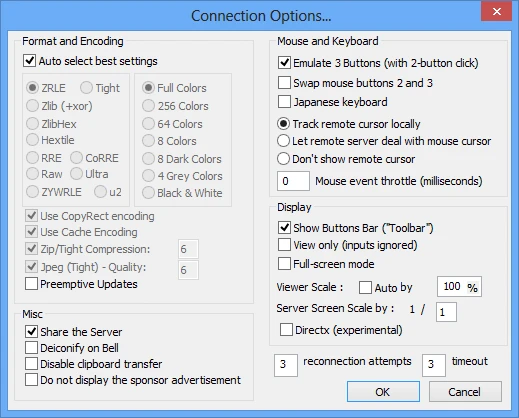
Features:
- The program features a powerful JavaViewer that allows users to transfer files and operate in reduced-color settings to suit their needs and preferences.
- The plugin system enables operations on data sent between the client and server to be performed using an external DLL. It offers additional permissions checking, exchange synchronization, data recording/saving, and encryption.
- Allows users to change resolutions without disabling them, improving the user experience.
- The program includes a built-in client-server text chat for easy communication between users, as well as the ability to send special keys to remote servers.
- Simple to use, with automatic configuration.
- Improved security features, including support for Microsoft Logon/NT protection.
- Optimal response time on sluggish networks thanks to bandwidth-saving techniques.
- Compatible with other VNC programs.