If you’ve upgraded to Windows 11, you’ve probably seen how much trash Microsoft installs on your system. All of this trash, often known as bloatware, waits in the background, consumes RAM, takes up space on your hard drive, and many of you don’t need it at all. It can be difficult to remove these apps using the built-in tools because there is frequently no uninstall option. There are numerous specialized apps available to counteract this, and Windows 11 Debloater is the perfect solution.
You can download Windows 11 Debloater for free from the link below. The version does not require activation, so go ahead and use it.
Essentially, this application is a graphical shell that runs exclusively on PowerShell scripts. It not only lets you delete system software but also turns off a slew of superfluous features, giving your device more breathing room.
The UI is organized into straightforward tabs, including EZ Debloater, Windows Apps, Privacy & Telemetry, and others. Microsoft Edge, OneDrive, Cortana, and a variety of weather and news widgets may all be uninstalled individually. If you prefer to keep everything under control, you can hit a specific button to read the script code that will be executed; you may even manually alter it if necessary.
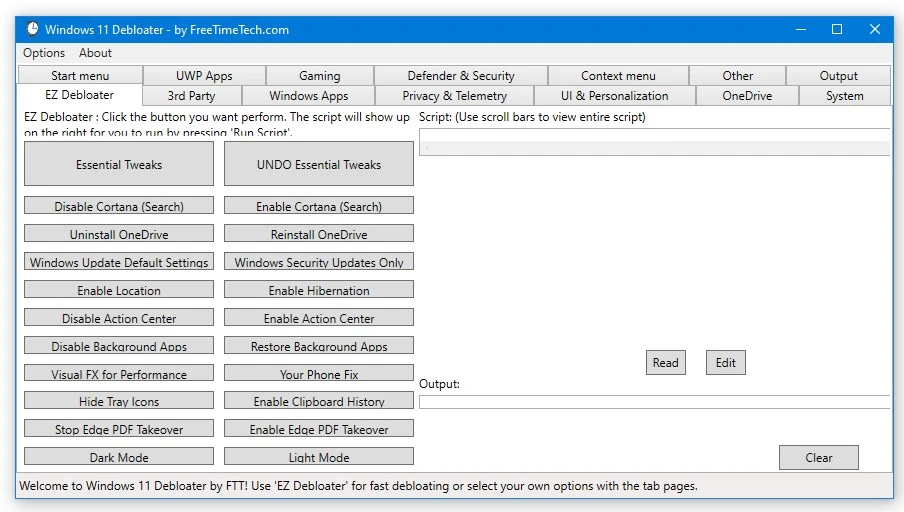
Peculiarities:
- This free program has a user-friendly interface and relies on open-source scripts for reliability.
- This tool removes third-party software and Windows system applications,
- turns off spyware, data collection, and telemetry,
- hides unnecessary items in the context menu and Start menu,
- displays script code before execution,
- and automatically creates a system restore point.
There is an Options tab with pre-made presets. Select Debloat Preset, and the application will automatically remove the garbage that the developers recommend deleting to speed up your PC. If you’ve overdone the cleaning or neglected to back up, the Windows Default Preset is a lifesaver.
As a substitute, I offer ShutUp10++, which is more focused on removing malware and tracking while also reducing system stress. There’s also a fantastic application called ThisIsWin11 that provides extra UI customization options.