One of our users asked me to include the ancient but intriguing freeware FolderMatch. This software is designed for Windows operating systems and allows you to compare and synchronize entire folders and individual files. Individuals and companies use it at work to ensure the latest versions of files are available while preventing data loss or corruption.
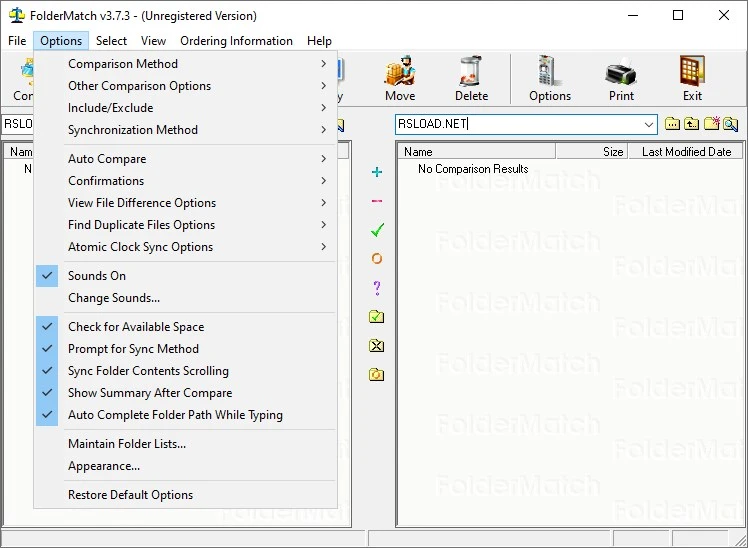
Features:
- Folder Comparison: Can compare whole folder structures, including subfolders and their contents, to find any discrepancies between them.
- File Synchronization: Can synchronize files between two folders or directories, guaranteeing that any changes made in one are reflected in the other.
- Duplicate File Finder: Identifies duplicate files across one or more directories, helping users conserve storage space and avoid confusion.
- Data Backup: Backs up files and folders, allowing users to retrieve lost or corrupted data in the case of a system crash or other data loss.
- File Management: Includes utilities for managing files, such as renaming, moving, and copying.
Advantages:
- Improved productivity: FolderMatch automates file comparison and synchronization, allowing users to focus on other tasks.
- Improved data integrity: By ensuring that files are kept up to date and properly backed up, the program helps enterprises and individuals avoid data loss or corruption.
- Reduced storage expenses: By finding and eliminating duplicate files, the application saves users storage space and data storage costs.
Overall, FolderMatch is a comprehensive tool that helps users manage their files and folders more efficiently, increasing productivity and reducing the risk of data loss or corruption.