
Quick CPU is a software for fine-tuning your processor and controlling your computer’s power consumption. It may appear complicated and reserved for sophisticated users, but that is not the case. The program includes ready-made presets you can use without having to go into the settings. Your system’s performance will improve without risking damage.
The software is compatible with Windows 7 through 11 and x64 computers. There is no Russian language support, and it is unlikely to be added in the future, but the interface is simple enough that you will figure it out. .NET Framework 4.6.1 is required to run. A quick CPU and a repack version are available for download below. It is completely free, with no cracking necessary.
Among its primary features are the ability to regulate the number of active CPU cores, adjust the frequency, and enable TurboBoost to maximize performance. The software can track the temperature, voltage, and power consumption of your processor in real time.
Another useful feature is the ability to control core parking. Windows automatically parks some cores to save power, which can sometimes degrade performance in games or intensive apps. With a few clicks, you can turn it off.
All changes are applied in real time, so there is no need to reboot your computer.
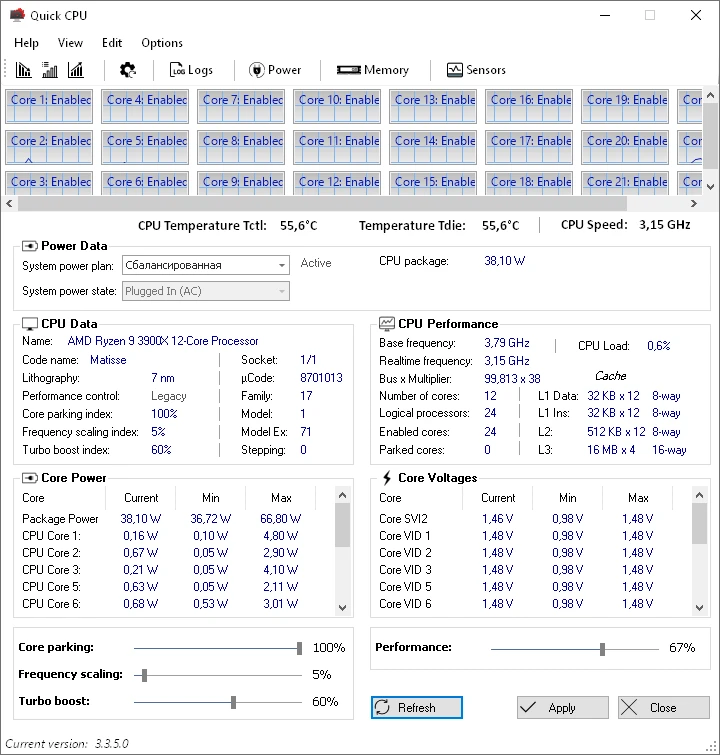
Features:
- CPU core and frequency management.
- TurboBoost Settings
- Temperature and energy usage monitoring
- Core parking management features ready-made profiles for rapid setup, adjustments without rebooting, and compatibility with previous operating systems.
Among similar tools, I’d recommend ThrottleStop, which is more focused on laptops and undervolting overclocking. It provides more advanced capability, but it is also more difficult to grasp. There’s also Process Lasso, which manages process priority rather than the processor.
Quick CPU is a useful tool, particularly for individuals who wish to monitor their hardware but dislike tinkering with the BIOS.