
Yandex Maps Downloader is a utility that allows you to download a specific section of Yandex Maps and save it to your computer. The name is quite obvious; essentially, you take a piece of the map and use its coordinates to download the tiles, and that’s it.
Yandex Maps Downloader can be downloaded for free with activation from the archive; everything is standard, and the registration process is the same for all of these programs.
The interface is identical to earlier programs: in the main window, enter the coordinates of the desired area, then choose a save folder. If necessary, you can use the slider to alter the zoom level. Keep in mind that the coordinates must be in the proper format; if you enter the wrong latitude and longitude, the application will download the incorrect area of the map, forcing you to start over. There is a tool inside that converts degrees, minutes, and seconds to standard degrees.
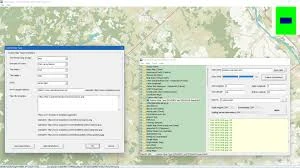
Once you’ve downloaded the appropriate area as photos, open them in the built-in viewer to ensure everything was downloaded properly. This is useful because if you choose a vast area or a high zoom level, there may be numerous tiles, and it is important to detect any faults right away.
All downloaded maps can be easily exported to a variety of formats, including BMP and more user-friendly formats such as TIFF and JPG. Maps can be loaded onto GPS-enabled devices using KMZ files.
You will have access to both regular and satellite maps; select the one that best meets your needs. I believe satellite navigation is more fascinating.
In summary, Yandex Maps Downloader is a useful application for quickly downloading Yandex Maps. SAS.Planeta