
I frequently look for ways to improve and adapt my operating system for various jobs, so when I first discovered WinScript, I was pleasantly delighted; it’s ideal for customizing Windows.
The UI is immediately appealing; its minimalist style, with a sidebar and detailed information on the right, gives the impression of a professional program. However, the most crucial aspect is its vast functionality.
The system may be easily managed using automatically created scripts. Choose the desired settings, and the application will generate a script to apply them. Furthermore, it all operates with administrator privileges, granting you complete control over the system. I was very impressed with the OS’s cleaning capabilities. WinScript lets you delete superfluous files, turn off built-in apps such as Edge and OneDrive, and even remove the contentious Recall feature. I’m not particularly concerned about privacy, but I appreciated the utility’s ability to restrict data collection and turn off features like Wi-Fi Sense and Cloud Sync.
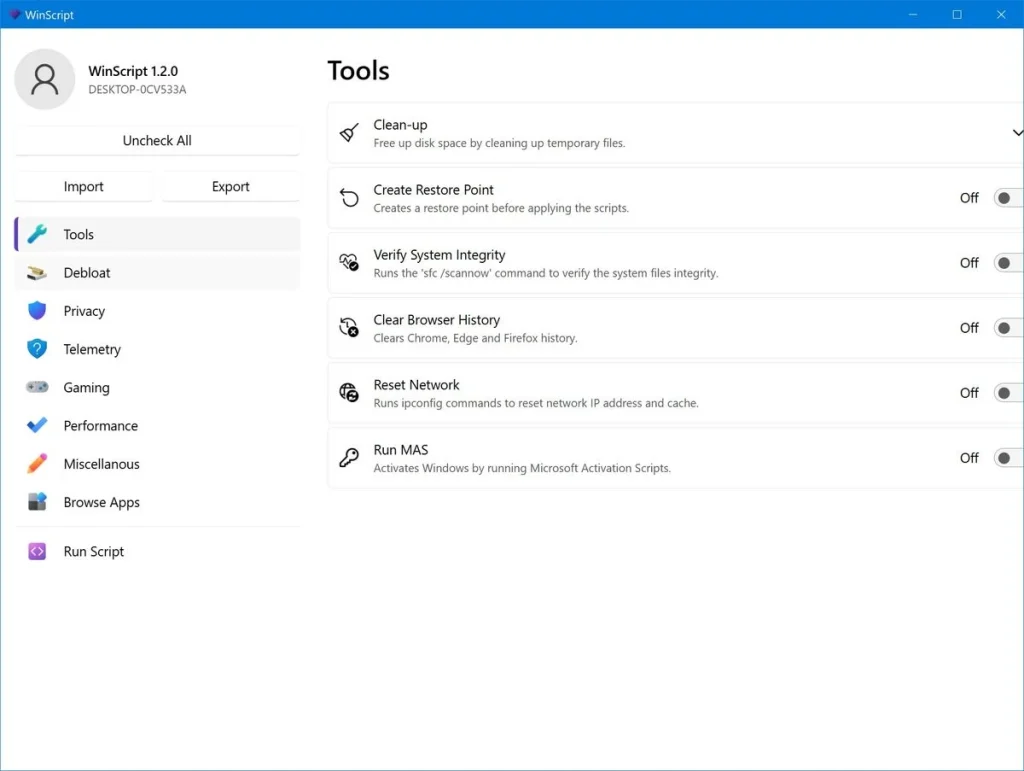
This software does more than just clean and protect your privacy; it also offers a range of performance optimization settings, gaming-specific features, and handy app recommendations. Here are the benefits that I saw while using it.
- The interface is intuitive.
- Powerful system customization capabilities
- Automated script generation
- Detailed privacy customization
- Performance optimization tools
Overall, it was a pleasure to share this finding with you. WinScript will be a genuine help to you if you wish to take control of your system. This is more than just a cleaning adjustment; you’ll receive a comprehensive tool for designing the system you’ve always wanted.