Are you looking for an easy solution to verify the authenticity of your Windows or Office installation? The Windows and Office Genuine ISO Verifier is here to help! This lightweight utility instantly determines whether your ISO files are genuine so that you can use legitimate software with ease.
Free
With its simple interface, Windows and Office Genuine ISO Verifier is ideal for those who want to prevent counterfeit software. Whether you’re installing a new machine or reinstalling Windows/Office, this utility gives you peace of mind by ensuring the integrity of your installation files.
Are you ready to verify your software? Download and install the Windows and Office Genuine ISO Verifier today! Once you’ve experienced it, let us know how the review compares to your experience. Did we cover all of your favorite features? If you notice anything missing, please leave a comment below. Start checking the legitimacy of your software right now!
Features of Windows and Office Genuine ISO Verifiers
Installation is straightforward, and the UI is intuitive.
Because the application comes in a portable package, installation is as simple as decompressing the archive and placing it in the chosen spot on your hard disk. If you’re having trouble accessing the file, try unblocking the tool from Properties in the context menu.
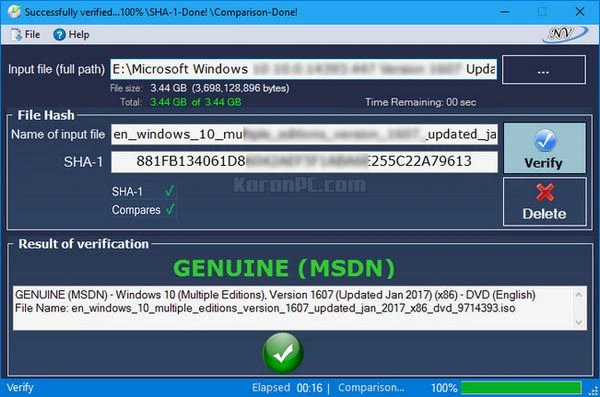
Even while it is not particularly eye-catching, the interface is user-friendly and unlikely to cause you any significant problems while browsing. The UI consists of a single, medium-sized window with fairly intuitive fields. As a result, utilizing the tool requires only specifying the input file, with the app handling the rest automatically.
It supports several versions and languages of Office and Windows.
The program’s strength lies in its ability to recognize a wide range of hashes linked with Microsoft’s operating system and Office suite. To be more specific, the application may compare the file’s SHA-1 hash with older Microsoft versions, such as Office 95 and Windows XP.
As a side note, if you have already scanned the file with other third-party software, you can enter the SHA-1 in the dedicated field to verify the file’s authenticity on the spot. However, validating an ISO file is not a time-consuming operation.
A valuable software that can save you from legal difficulties.
If you wish to reinstall Windows or Office at work or home but don’t know much about the file you found, Windows and Office Authentic ISO Verifier may help you determine whether you have authentic versions of the program.
Supported OS and Office (MSDN, VLSC) – x32 and x64 versions (all languages)
- Windows 11 Windows 10 – Version 1607 RS1 – MSDN (January 19, 2017)
- Windows Server 2016 (x64) – Release Date: December 1, 2017.
- Windows Server 2016(x64)
- Windows 10 – Version 1607 RS1 LTSB (Updated July 2016):
- Windows 10 Version 1607 RS1 – VLSC (Updated July 2016):
- Windows 10 – Version 1607 RS1 – MSDN (Updated July 2016)
- Windows 10 Version 1511 – VLSC (Updated April 2016):
- Windows 10 – Version 1511 – MSDN (April 2016):
- Windows 10 Version 1511 – MSDN (Updated February 2016):
- Windows 10 Version 1511 – VLSC (Updated February 2016):
- Windows 10: Version 1511
- Windows 10: Version 1511 VL (VLSC)
- Windows 10 Office 2016 RTM (MSDN) and VL (VLSC)
- Windows XP, Windows Vista, Windows 7, Windows 8, Windows 8.1, Windows 8.1 with Update, Office 2003, Office 2007, Office 2010 (MSDN and VLSC), Office 2013 (MSDN and VLSC), Office 2016, and Office 95.
- Windows Advanced Server
- Microsoft Essential Business Server 2008
- Windows Home Server
- Microsoft offers Windows Home Server 2011, Windows Server 2003, Windows Server 2003 R2, Windows Server 2008, Windows Server 2008 R2, and Windows Server 2012 Essentials.
- Windows Server 2012 R2: Essentials.
- Windows Server 2012 R2 Essentials, Windows Server 2012 R2, and Windows Server Technical Preview are all available with updates.
- Microsoft Small Business Server 2008
- Microsoft Small Business Server 2011
- Windows Storage Server 2008
- Windows Storage Server 2008 R2
- Windows Technical Preview
- Windows Thin PC and Server Technical Preview 2
Portable Windows and Office Genuine ISO Verifier.
Portable Windows and Office Genuine ISO Verifier allows you to use your verification tools on the go! No installation is necessary; run it from a USB or external device. It is ideal for IT professionals and mobile users, as it includes all desktop functions and allows you to verify ISO files at any time, from any location, without leaving any traces on the host machine.
System requirements
Microsoft.NET Framework 4.0 Client Profile.
Operating Systems: Windows XP/Vista/Windows 7/Windows 8/Windows 8.1/Windows 8.1 With Update/Windows 10/Windows 10 – Version 1511 and 1607(x32, x64)/Windows 11.