TurboVNC is a remote desktop access application that employs the VNC protocol. One of its advantages is that it is open source, uses minimal system resources, and delivers excellent performance. The project was initially intended to transport enormous amounts of 3D graphics over a network, so both speed and image quality are exceptional.
To use it, connect to another computer and see its desktop as if you were sitting right in front of it. It helps provide technical support, working remotely, and helping someone with an issue. A password is required for connection and is configured in the settings to prevent unauthorized access to your computer.
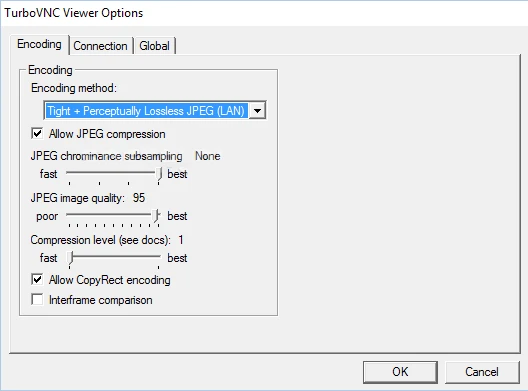
TurboVNC is available for free download from the link below. Since the application is fully open source, no cracks or license keys are required.
- The UI looks archaic and reminiscent of Windows XP, yet everything is simple, and nothing is unnecessary.
Options can be turned on and off with a few clicks, and screen resolution is selected from a drop-down menu.
You may set lossless image quality, and it will automatically adjust to any display size. - TurboVNC supports the Tight codec with JPEG optimization, enabling flawless image transfer even over slow network connections. It works with Windows and other operating systems, and you can download versions for different platforms from the official website.
Compared to standard TightVNC or RealVNC, the Turbo version performs significantly faster, especially with heavy content such as video and 3D applications—anything with a lot of movement on screen.