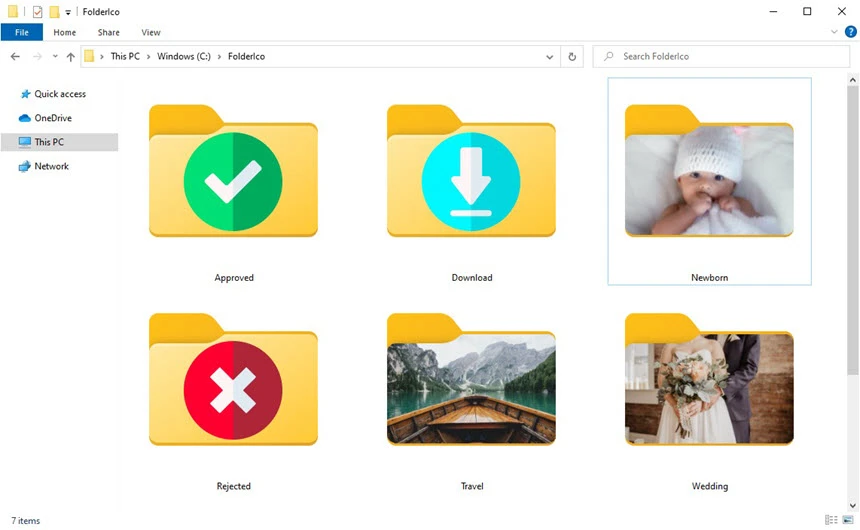
TeoreX FolderIco is a small Windows application that allows you to change the appearance of folder icons. It enables users to quickly and reliably change the appearance of folders, making file management more visually appealing, straightforward, and efficient. Users can easily distinguish categories, projects, or priorities without opening them if folders are assigned unique icons or colors.
Goal
TeoreX FolderIco aims to improve folder organization and visual clarity in the Windows file system. This application is highly beneficial for users who manage large numbers of files, such as developers, designers, office workers, and students. FolderIco reduces travel time and errors in file management by replacing standard folder icons with custom icons.
Full features:
- Customize the folder icons
- Change folder icons with a single click.
- Apply icons via the context menu (right-click).
- Supports standard icon formats, including ICO.
- Capability to use colored and graphic icons.
- Colored folder icons.
- Assign predefined color icons to folders.
- Helpful in organizing folders by kind, status, or importance.
- Helps visually identify folders at a glance.
- Context menu integration.
- Seamlessly connects with Windows Explorer.
- Quickly change icons without opening the main application.
- Increase workflow efficiency.
- Icon Library.
- Contains a built-in set of folder icons.
- Providing a wide range of styles ideal for both professional and personal use.
- Users can reuse icons in various directories.
- Restore the default icons.
- Easily restore folders to the standard Windows icons.
- Ensure secure customisation without permanent modifications.
- Lightweight and swift
- Using the least amount of system resources possible
- Run Windows Explorer smoothly without slowing down.
- Permanent folder customization
- Icon modifications continue after the system restart.
- Compatible with the typical Windows folder behavior.
Conclusion
TeoreX FolderIco is a user-friendly tool for graphically organizing files and folders. With a straightforward user interface, context menu integration, and support for custom and colored icons, the software boosts efficiency without adding complexity. Its low system requirements and consistent performance make it ideal for both casual and professional users.