First, some background: This product was created in 1996, just like its website. The objective was straightforward: eliminate the need for you to download each of Mark Russinovich’s innovations individually by combining all service packages into a single location. Microsoft purchased Sysinternals in July 2006. Therefore, you will receive a huge number of service programs for managing, troubleshooting, and performing basic diagnostics of both individual applications and Windows operating systems if you choose to acquire the Sysinternals Suite from our website.
All the utilities included can generally be categorized. For instance, network tools allow you to observe active sockets, perform security analyses of various resources, and use connection monitors. Although the list is lengthy, you will find it on your own. Additionally, there is a section named “System” that includes minor utility apps that assist you in viewing and configuring resources and components. You may see programs that start automatically when Windows boots, monitor real-time file system activity, determine the driver load order, and more.
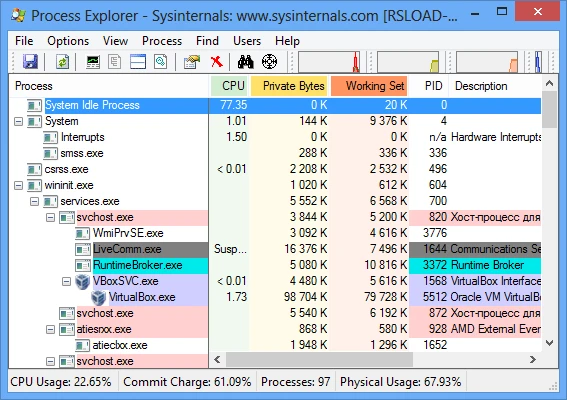
Security software is also available from the Sysinternals Suite. You will get access to Spyware Hunters, a rootkit search-and-removal tool, and the ability to customize and maintain your security system. Among many other things, you can examine the event log, a list of users, and the list of users who are logged in. The “Processes and Threads” category follows, which should go without saying: we’ll examine processes, their relationships, threads, and more. Of course, the Sysinternals Suite also provides great tools for working with files and hard disks.
Some utilities are available individually on our Russian website. Naturally, the majority continue to speak their native tongue, but we are grateful to the generous individuals who offer accurate and prompt translations.
The official website provided the information. Once the archive has been unpacked, all that is visible are several utilities. You must know exactly what you need, because categories won’t provide a pleasant user interface. Visit the official website first, browse all the categories I listed, and then select what interests you. All things considered, I hope you find the Sysinternals Suite utility package helpful; it’s actually rather comprehensive, and there’s a lot to discover.