Download the RustDesk program for free, as well as a full version, a Remote Desktop program, and remote computer control. You can use your computer to access the internet without sitting in front of a screen. Latest version
What’s RustDesk
RustDesk is an open-source remote control program developed using the Rust programming language, which is known for its security and performance. It allows remote control and access to other computers without relying on a central server, with security risks. Therefore, it suits those who want high security, Good performance, and more privacy.
In an era where remote work (Remote Work) has become a new standard. Having powerful and secure remote computer control tools is very important. RustDesk has grown in popularity as a reliable remote control software with outstanding features. Whether it’s a software developer, a Network administrator, or general users who want to access their computers at home or at work from another place
The program offers a choice of basic, open-source, and free servers. Professional servers with all the features can be purchased from the program’s website. This option makes it suitable for both general users and organizations that need efficient and customizable remote control solutions.
Properties
- Open source is where users can access and improve the source code. Make it transparent and safe.
- High security: End-to-end (E2E) encryption based on NaCl ensures that data transmitted during remote control is safe from eavesdropping or data theft
- No central server is required. We can set up our own hosting solutions on our infrastructure. This allows us to control access and increase privacy.
- Supports multiple platforms: Supports use on many operating systems such as Windows, macOS, Linux, iOS, Android, and Web, allowing users to use it on a variety of devices
- High efficiency: Supports encryption with VP8/VP9 /AV1 in software and H264/H265 in hardware, making the transmitted image sharp and uninterrupted
- Easy to use: Designed to be easy to use. Users do not need administrative or installation privileges in Windows, and can upgrade them locally and remotely when needed.
RustDesk good?
- Compared to other remote control software such as TeamViewer or AnyDesk, this program has several outstanding advantages:
- No charge: Because it is open source software, users do not have to pay for it. It is also transparent and safe.
- Security & Privacy: Not having to rely on a central server increases security and privacy in use
- Customization ability: Users can customize the source code and features according to their own needs
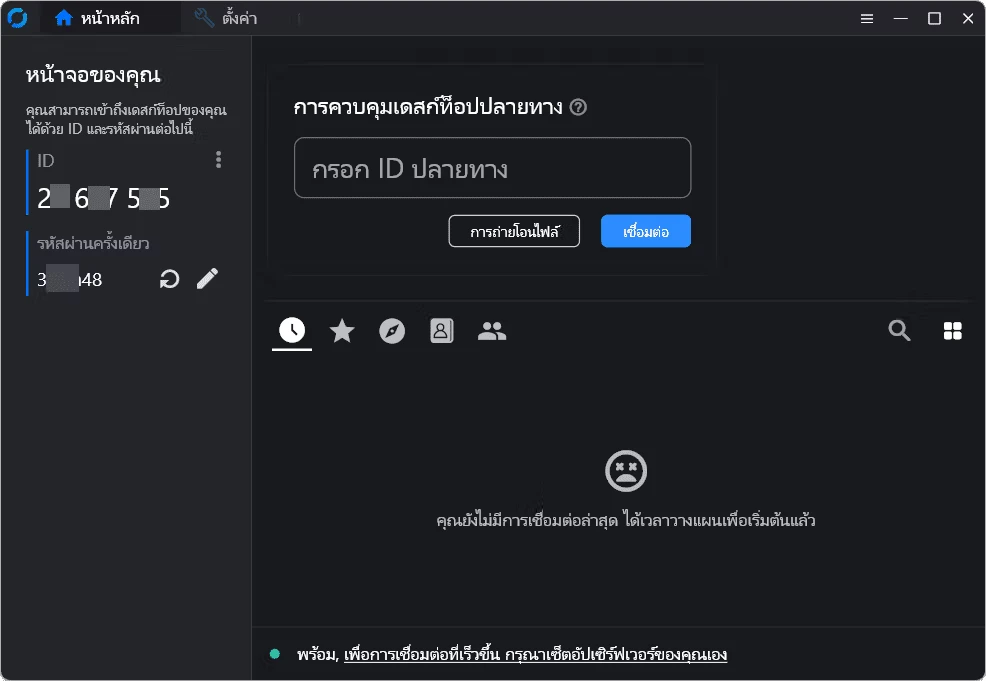
How to use RustDesk
- 1.1.a Basic use
- Open program:
- After installation, open the program
- Server settings (Optional):
- For maximum privacy, you can set up your own server
- Connect to a remote computer:
- On the main page of the program, your computer’s ID will be displayed
- Send this ID to the person who wants to control your computer
- But if you want to remote control another remote computer, ask the person you want to remote control the machine for an ID, and enter this ID in the field given in the program
- Encryption and Security:
- It uses end-to-end encryption (E2E) for data security
- You can set a password for your connection to increase security
- 2.2.a Using various features
- Sending files:
- When connected to a remote computer, we can send files between our computer and the remote computer by dragging and dropping files in the program window
- Remote control:
- We can control a remote computer just like using our own computer. Whether it’s opening the program, closing the program, or adjusting various settings
- Conversation:
- There is a text chat feature that allows us to communicate instantly with remote computer users
- 3.2.a Advanced settings
- Own server settings:
- If you want to host the server yourself, you can download RustDesk Server from the website and follow the installation manual
- Customizing various values:
- We can set several settings. Customize the program according to your needs, such as setting the image resolution. Codec selection (VP8/VP9/AV1 or H264/H265) and access rights management