
PentaLogix CAMMaster Designer is a powerful, professional CAM (Computer Aided Manufacturing) environment tailored for PCB engineers, fabricators, and advanced CAM users. The software has a robust set of design analysis tools, automated processing capabilities, and workflow acceleration features tailored explicitly for demanding industrial environments. The program is intended to simplify PCB data preparation, decrease errors, and significantly boost productivity through efficient procedures and precise tooling.
PentaLogix CAMMaster Designer’s purpose:
The primary purpose of CAMMaster Designer is to offer an exact, efficient, and automated environment for preparing PCB data for manufacturing. The software enables engineers and technicians to:
Modify and optimize customer input design data.
Identify manufacturing concerns before production.
Create clean, build-ready CAM outputs.
Automate repetitive tasks to minimize human error.
Increasing throughput in high-speed PCB shops
By incorporating advanced DFM checks, netlist verification, and automation commands, the software intends to reduce production cycles and improve manufacturing dependability.
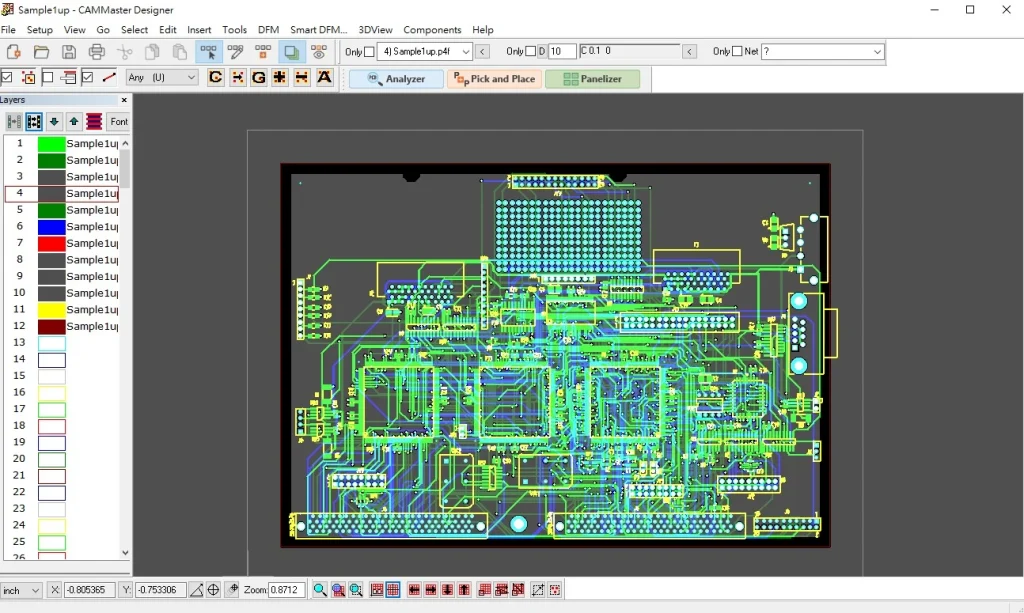
Key Features:
- Convenient project assembly
- Gerber, drill, netlist, and fabrication files can all be imported with ease.
- Layers are automatically detected, enabling rapid project launch.
- The use of layer alignment tools ensures that imported data is correctly placed.
- View and edit layer stacks to quickly confirm.
- Comprehensive CAM editing tools.
- Full suite of editing functions, including draw, modify, cut, combine, remove, move, scale, and rotate.
- Aperture and D-code control for shape and tool assignment.
- Add or modify trace routing, copper fillers, solder mask apertures, silkscreen elements, and mechanical external lines.
- Polygonal manipulation and reconstruction of copper castings.
- Automatic error-checking
- Design Rule Checks (DRC) include spacing, ring-shaped, short circuit, open, and other criteria.
- Comparing the electrical compatibility between the netlist and the Gerber.
- Missing drill detection and tool table validation.
- Highlight and indicate errors in the workspace to make rapid repairs.
- Quick panel creation tools.
- Create production panels in minutes with automatic array formation.
- Supports step-and-repeat copies, rotation, and composite layout panels.
- Panel borders, connecting lines, tool holes, separator tabs, and scribe lines all have adjustable settings.
- Control over V-cuts, mouse biting, and panel frame construction.
- Preparing Data for Construction
- Gerber and drill file output is fully optimized for use by any PCB maker.
- The creation of construction drawings, drill drawings, and documentation layers.
- Create final build packages containing readme, stackup, and notes files.
- Output formats are compatible with all conventional CAM workflows.
- Visualization & Inspection
- High-resolution graphic display with a multi-layer covering.
- Transparency and color coding facilitate layer examination.
- Cross-search the DRC error report and the workspace.
- 3D board preview (if available) for visual inspection.
- Automation and Productivity.
- Batch processing is used to handle repetitive jobs.
- Standardize your production preparation with template-based procedures.
- Steps are automatically generated based on the data entered.
- User-configurable shortcuts and toolbar layouts.
- File Compatibility
- Read and write standard formats, including:
- Gerber (RS-274X and Extended versions)
- Excellon and NC drilling files
- ODB++ (import levels vary)
- IPC-D-356 Network List.
- DXF for mechanical outlines.
Conclusion
PentaLogix CAMMaster Designer is a practical CAM solution for anyone working with printed circuit board manufacturing data. Its merits include ease of use, quick panelization, rich editing facilities, and thorough error checking. Whether you’re creating a prototype or managing high-volume production, our software reduces setup time, improves reliability, and eliminates many manual tasks that cause manufacturing delays. It is an indispensable tool for effective PCB pre-production.