Want to increase business efficiency and improve project management? ManicTime Pro enables you to keep up with your colleagues’ work, send precise progress reports, and manage your time more effectively than ever before.
This software can improve your company’s efficiency in both internal employee affairs and external relationships. It provides precise insights into how time is spent, allowing you to find bottlenecks and opportunities for development. ManicTime Pro allows you to make data-driven decisions that streamline workflows and increase productivity.
Are you ready to gain control of your time and increase your business performance? Download ManicTime Pro now! Gain precise insights on your employees’ productivity and make informed decisions to improve efficiency.
Features of ManicTime Pro Full:
Automatic tracking
ManicTime automatically monitors your computer usage. It remembers which apps you’ve used and how long. It will also remember which websites you’ve visited and the papers you’ve worked on. All of these information will help you keep track of your working hours.
ManicTime captures data on your PC and does not send it somewhere else. It is not shared with us or any third parties and exists only on your computer.
Offline work.
ManicTime is not a cloud-based service; instead, it employs a local datastore, thus all recorded data is stored on your machine. This also means that it will function properly whether or not an internet connection is available.
Accurate timing
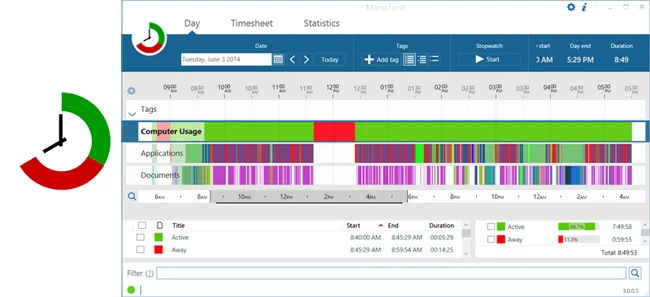
ManicTime will provide all of the data it collects in an easy-to-understand graphical interface. This will allow you to readily determine when you went to lunch and swapped tasks. From now on, your logged hours will be accurate and easy to follow.
Easy timesheets.
It’s simple to generate practically any type of report using the hours you’ve logged. Once you’ve created the report, you can easily transfer it to Excel or another application to generate an invoice.
integrate with other systems.
ManicTime can interact with task-based systems such as Jira and GitHub. You can enter your work hours into ManicTime and then send the timesheet back to the specific issue.
Company-wide reports
Use ManicTime with your organization or team. ManicTime Server will collect all data and create informative reports.
Automatic tagging
ManicTime collects a lot of data, which you may utilize to develop work tasks. For example, you may classify all Facebook activity as “Browsing” and all MS Word usage as “Work”.
Away Time
Tracking non-use is just as crucial as tracking computer usage. When you leave the computer, ManicTime will record this as Away time. When you return, you can make a note of what you did while away.
Stopwatch
Even though ManicTime excels at automatic time tracking, you can use a stopwatch to manually track your progress.