As someone who routinely manages several projects and data kinds, keeping my Windows drives organised is an ongoing challenge. While Windows includes a Disk Management tool, I’ve found it very limited for advanced use. In my experience with disk management software on Windows 11, IM-Magic Partition Resizer stands out for its combination of capability and simplicity. It gives me the granular control I need to restructure my storage without worrying about data loss, making chores like expanding my nearly full C: disk or establishing a new partition for backups a stress-free experience.
Key Features of the IM-Magic Partition Resizer
- Extensive OS and hardware support: Supports all recent Windows versions, including 32 and 64-bit Windows Servers, and is RAID-compatible at all tiers.
- Universal File System and Disk Support: Safely resizes FAT16, FAT32, and all NTFS versions (v1.2, v3.0, v3.1) on MBR and GPT disks, including enormous 2TB drives.
- SSD-Optimised Operations: Provides full support for SSD drives, ensuring secure partitioning compatible with solid-state technology.
- Non-Destructive Resizing: Move or resize partitions using just available free space, ensuring that your existing files and folders remain intact.
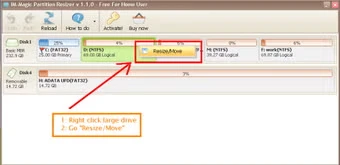
- Visual Size Adjustment: A straightforward interface with a slider lets you visually adjust partition sizes or enter exact MB values, and provides a clear preview of unallocated space.
- Safe and Reversible Process: All modifications are staged for review before final application, allowing you to amend or revert to the original layout simply.
- System requirements for Windows.
- Operating Systems: Windows 11, Windows 10, Windows 8.1/8, and Windows 7 (both 32-bit and 64-bit versions).
- Windows Server: All major server editions (2019, 2016, 2012, 2008, etc.) are available in both 32-bit and 64-bit architectures.
- Processor: 1GHz or faster (x86 or x64).
- RAM: A minimum of 512 MB (1 GB or more is recommended).
- Hard Disk Space: 200 MB free space for installation.
Why do I recommend IM-Magic Partition Resizer?
After thorough testing, I confidently state that IM-Magic Partition Resizer is a dependable and easy-to-use disk management application. If your primary goal is to expand a partition without losing data—whether you need to extend the C drive because it is running low or shrink the Windows 11 volume to create new partitions—this software provides. It works flawlessly as a capable free partition resizer for basic operations, with professional tiers for more demanding requirements. For anyone looking for sophisticated yet secure partitioning software to perform Windows partition resizing, this is a top-tier option I strongly recommend.
Advantages of IM-Magic Partition Resizer Portable Edition
The portable version of IM-Magic Partition Resizer is ideal for customers who like to use the software without installing it on their computer. You may carry the portable file on a USB flash drive and execute it on any Windows PC immediately. It does not affect your Windows registry or leave any leftover files, so your system remains clean and optimised.