
Introducing HttpMaster Professional, a robust Windows application that simplifies API testing and development. Whether you’re an experienced developer or just starting, HttpMaster Professional provides simple tools for creating and analysing HTTP requests and responses. The user-friendly interface lets you easily build and run complex test scenarios, validate API responses, and track performance data. Enhance your API testing with capabilities such as parameterisation, data-driven testing, and stronger authentication. Download HttpMaster Professional from the developer’s website today to streamline your API testing workflow like never before!
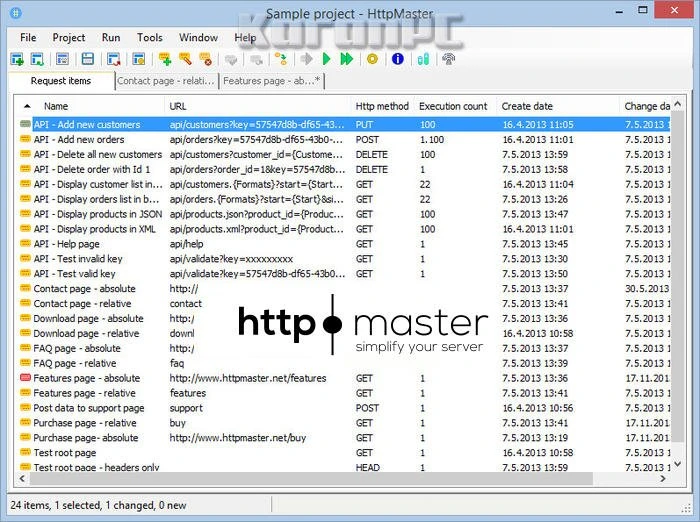
Features of HttpMaster Professional Full:
A wide range of HTTP properties.
The HttpMaster project offers many options for fine-tuning the HTTP requests it produces. These include request encoding, global URL and query string, global HTTP request headers, and a few advanced properties such as URL encoding and the ability to turn off execution data storage altogether, which can be helpful if you want executions to complete as quickly as possible without collecting any data.
Parameters
In project properties, you can also specify parameters for various data kinds and generation types. Parameters allow you to add dynamic data to request items, which can be handy for generating multiple requests based on parameter values or creating global, reusable values.
All given parameters can be utilised with request item characteristics, such as the URL.
Validate response data.
By default, HttpMaster validates each processed request using the system validation. The default system validation checks the HTTP status codes returned by the server and determines execution results accordingly. However, you can declare custom validations in project attributes and then utilise them to create custom validation logical expressions for each request item. There are various forms of custom validation available, most of which validate the response body.
Request Chaining
The HttpMaster project allows you to define chained items of various types, which can subsequently be used in request items to include data from previous requests. You can use these projects to chain things in request item properties, such as the URL. This will dynamically insert data from the preceding request wherever chaining is used. In this approach, you can establish a chain of requests, with each request using some data from the preceding one.
Extensive data upload support.
Various data attributes can be specified when creating a request item, including the HTTP method, URL, and more. HttpMaster also provides extensive data upload capabilities; it allows you to publish plain text data, the contents of specific files, or multipart form data that may comprise both plain text data and disk files. Request body data for uploading can also be generated automatically from existing HTML content retrieved from an internet address (URL) or a disk file.
Request Data Builder
If you need to test a specific website with a variety of input data, you can create a request body from the current HTML text in a URL or a disk file. HttpMaster will identify all HTML input elements within FORM tags and present them in a list, allowing you to include them in the request body. HttpMaster will extract all possible values from HTML content for all HTML elements with multiple options (e.g., radio buttons or SELECT elements) and automatically generate multi-value parameters based on the retrieved data values.
Request item execution.
HttpMaster has powerful execution features that let you run only open request items, only selected request items, or all project request items. It is also possible to build execution groups and manage only the request items that belong to them.
Throughout execution, you can track progress and the status of each request item. HttpMaster additionally allows you to save all execution data to an external file with the ‘hmex’ extension. You can reaccess this file later to review execution data.
Execution groups and Conditional execution
Selecting the same collection of request items for execution repeatedly might become tedious and time-consuming. If you need to execute the same request elements several times, consider using execution groups. Execution groups are useful features for simplifying the execution of multiple request items. They allow you to specify a custom execution order for each request item in the group.
Execution groups also allow the conditional execution of request items based on the results of another request item in the same group. For example, you can specify that a specific request item will only be executed if another request item is successfully executed.
Comprehensive data review.
Once a request item is completed, you can open and view its execution results. Various execution statistics are available for evaluation, such as HTTP headers, cookies, response data, size, and duration.
HttpMaster also includes several visually appealing viewers for displaying response data in formats such as XML, JSON, HTML, CSS, and more. The majority of beautiful viewers allow you to expand or collapse code sections using code folding.
Response data can be handled further, such as exporting the response body to an external file, searching for a specific term, generating a PDF report, and so on.
Additional tools.
HttpMaster also includes several other tools, such as the ad hoc HTTP request tool. If you need to execute a simple HTTP request rapidly, setting up a project and a request item may not be the ideal approach. In such cases, you can utilise this ad hoc request tool, which also supports comprehensive execution data review and management.
You can also use a command-line interface to automate the execution of HttpMaster projects. Command-line execution results are saved in specific files that can be viewed in HttpMaster to see the entire execution data.