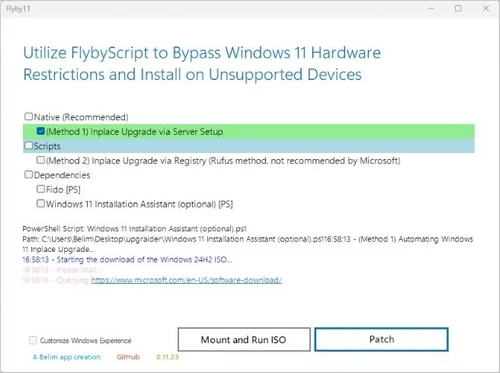
Flyby11 is a simple yet effective patcher that removes the restrictions that prevent you from installing Windows 11 (24H2) on unsupported hardware—got an old computer? No TPM, Secure Boot, or unsupported processor? Not a problem! Flyby11 lets you easily install Windows 11 24H2 on your outdated system.
Flyby11 has no complex steps. Execute the application, and you’ll be using Windows 11 on unsupported hardware in no time. Imagine sneaking through the back door without anyone noticing.
Whether you want to breathe new life into an ageing PC or enjoy the latest Windows 11 features, Flyby11 is your go-to solution. Ready to upgrade? Download Flyby11 today to maximise your hardware’s potential!
Have you used Flyby11? Please share your experience in the comments section below. Have we covered all of the aspects you enjoy, or is there anything we missed? We’d love to have your feedback!
Features of Flyby11
Older PCs
If you have an older PC without a Trusted Platform Module (TPM), Secure Boot, or a supported chip, you’re in luck! Flyby11 offers a solution that allows you to install Windows 11 version 24H2 on your PC despite specific hardware or software limitations. This application removes the typical hurdles, allowing you to enjoy the latest features and improvements in Windows 11 without interruption. Whether updating from an older version or installing from scratch, Flyby11 makes the procedure simple and accessible to all users.
Streamlined Process
Flyby11 dramatically speeds the Windows 11 installation process, making it accessible to consumers without technical knowledge. Rather than going through multiple stages, you can download and execute Flyby11 to swiftly install Windows 11 on older hardware. It uses a unique mechanism throughout the Windows 11 installation process that leverages the Windows Server version. Unlike the standard Windows 11 installation, which requires strict hardware compatibility checks, this alternative allows you to avoid several of those requirements. As a result, you can install Windows 11 on devices previously considered incompatible, allowing more people to benefit from the operating system’s features and performance, regardless of how old their hardware is.
Easy Upgrade to Windows 11
Flyby11 makes it easier than ever to experience the benefits of Windows 11, making it an excellent alternative for anyone looking to replace their ageing computers. As a result, Flyby11 may run on machines that would otherwise be considered unsupported by the standard Windows 11 installation, allowing users to install and run Windows 11 on a broader range of hardware combinations. This functionality is handy for rejuvenating older systems or custom-built PCs that may not meet standard standards.
Technical breakdown of the process.
Windows Server Setup: The utility uses the Windows Server setup, which skips the standard checks for TPM, Secure Boot, and CPU requirements. Install Regular Windows 11: Despite running in server mode, the setup installs the standard Windows 11 version (not the server version). Manual ISO Preparation: Flyby11 automates the ISO download and mounting, eliminating the need for human tweaking. You can obtain the ISO from official sources, or the utility will handle it using the Fido script. This method is the same as specified in the official Windows documentation for upgrading unsupported systems, which is covered in this article.
Bypass Requirements:
Flyby11 enables you to install Windows 11 24H2 on hardware that does not meet the requirements. There are numerous manuals available online that outline strategies for overcoming the limitations imposed by the Trusted Platform Module (TPM), Secure Boot, and processor compatibility. However, Flyby11 makes this procedure easier by automating these bypass methods, allowing people to install the operating system without requiring substantial technical knowledge or manual participation. This makes it easy for people who use unsupported technology to take advantage of Windows 11’s new features and security upgrades.
Flyby11 lets you easily upgrade your system without the usual limits. Flyby11 enables you to explore Windows 11’s amazing new features and advancements. You may continue to enjoy the performance and familiarity of your current computer, making the transfer easy and painless!
1. What is Flyby11, and how does it operate?
Flyby11 is a straightforward patcher utility that eliminates the limitations that prevent you from installing Windows 11 (24H2) on unsupported hardware. It removes prerequisites such as TPM, Secure Boot, and unsupported processors, allowing you to install Windows 11 on older devices with a few clicks.
2. Is Flyby11 safe to use?
Yes, Flyby11 is safe to use. It operates by changing system checks throughout the Windows 11 installation process to ensure compatibility with older hardware. However, always back up your data before making system changes, as changing installation requirements can pose problems.
3. Can I utilise Flyby11 to update to Windows 11 on any computer?
Flyby11 is intended to overcome hardware limitations, but your computer must still fulfil Windows 11’s baseline performance requirements (for example, sufficient RAM and storage). If your computer is too old to run Windows 11 smoothly, Flyby11 may not alleviate performance concerns.