Filezo is a sophisticated, lightning-fast search tool that helps Windows users find files, directories, and apps in seconds. Instead of browsing infinite directories, you can type a few characters to launch what you need. Filezo produces clean, practical results, so you won’t waste time browsing through junk.
What distinguishes Filezo is its capacity to search across local files, online storage, and even network locations in under five seconds. It also lets you tag files and folders for easy access, further increasing productivity. Organizing your digital workspace is made more straightforward with hierarchical tagging and color coding.
Overall, Filezo is ideal for consumers seeking speed, organization, and a more seamless Windows experience without extra complication.
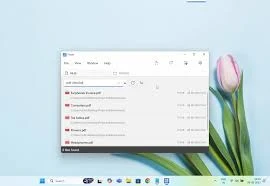
Features of Filezo:
Avoid the daily unnoticeable stress caused by
- Finding scattered files
- Navigating Deep Folders
- Accessing Slow Network Paths
- Searching the messy Windows desktop.
- Filezo interfaces with the Windows File Open/Save window, allowing you to select any file or folder from Filezo.
- FileZo has a file previewer that lets you quickly view documents, images, audio, or video files.
- Filezo automatically keeps track of the files you’ve recently visited and downloaded. It makes launching even faster.
- And there is much more.
Saves plenty of time.
With only a few keystrokes, you can launch any document, folder, or application.
Avoids outdated methods for accessing folders.
Filezo eliminates the need for time-consuming folder navigation. There is no need to navigate deep folder trees and menus to start any document, folder, or program. Just type and go!
Made it even easier
Assign tags to files and folders. Group them by project. You may access them with a single click. Assign tags straight from the Windows File Explorer.
Transfer or share tags with others.
Tagged files can be copied to other locations, including network drives. Additionally, you can share your marked files with other Filezo users.
There’s nothing to learn.
Filezo is simple and works out of the box. You do not have to configure your favorite files or folders. Install and experience the magic.
Best on top.
Automatically tracks the files and folders that are most essential to you. The most recently downloaded or visited files are listed first. It makes the launch easier.
Bypass your file manager.
Perform everyday file operations, such as copying, deleting, and renaming files, without starting your file management app.
Include a personal message in any file or folder.
Create a text note for any file or folder. Find them easily by searching within the notes.
Access remote folders as local
Automatically lists the network folders that you have access to. Launching a network folder at any level takes less than three seconds.
Does more than merely launch.
Drag and drop a file into an email, then use the built-in previewer to compare documents, photos, music, or video instantly.
Best Features
- Automatically recognizes your favorite files and folders
- Tag files and directories.
- Annotate files and folders.
- Preview many file kinds.
- Choose files faster in the File Open/Save window.
- Innovative methods of copying files
- Easily start any file or folder.