
CADAPULS APLUS is an advanced productivity add-on for Autodesk AutoCAD that aims to speed up project development, enhance drafting consistency, and decrease repetitive tasks. The add-on extends AutoCAD’s standard core capabilities by incorporating specialized commands and a comprehensive block library designed for efficient, professional drafting.
APLUS comprises two fully integrated parts: APLUS Commands, which are special AutoCAD commands that automate and improve drawing operations. BIINDEX Block Library is a structured and indexed collection of intelligent blocks for easy insertion and standardization. Together, these components create a straightforward drafting environment that boosts speed, accuracy, and drawing quality.
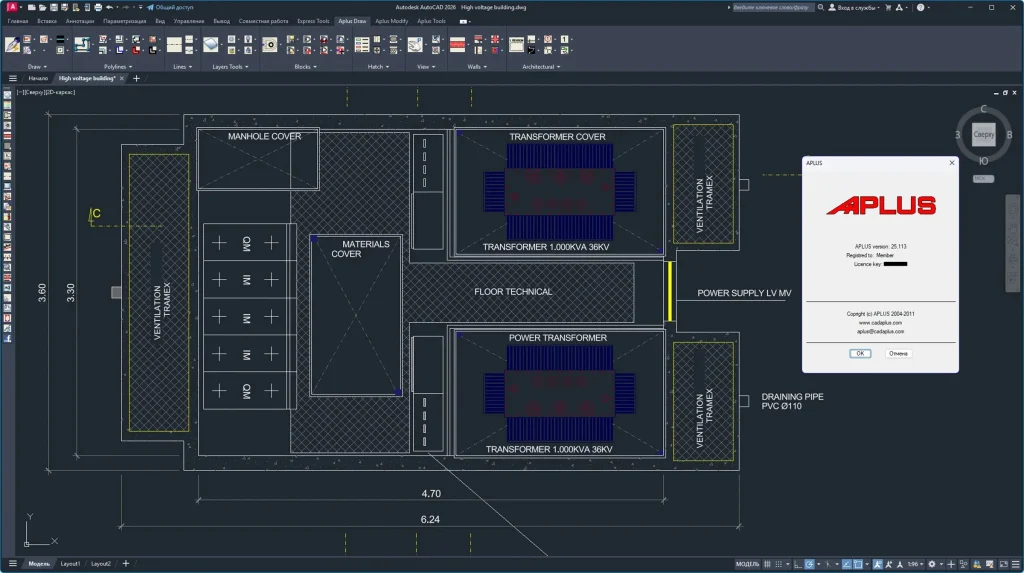
CADAPULS APLUS goal.
The primary aims of CADAPULS APLUS are:
- Reduce sketching time by automating frequent, repetitive tasks.
- Standardizing maps among teams and projects.
- Improve the correctness and consistency in CAD documentation.
- Increase productivity without modifying the core AutoCAD workflow.
- Custom commands allow you to easily access frequently used tools and blocks.
- APLUS is designed for professionals who require speedy project delivery while keeping high drawing standards. Feature Overview
- Productivity and Automation Tools.
- Standard design procedures can be performed with a single-click command.
- Automated production and adjustment of design elements
- Batch processing tools for applying modifications to multiple items or designs.
- Command sequences for everyday tasks have been reduced.
- Advanced design and editing features.
- Intelligent object manipulation goes beyond typical AutoCAD commands.
- Advanced cut, extend, copy, and align tools.
- Specialized instructions for controlling complex geometry.
- Quicker editing of multiline lines, blocks, and text objects
- Layer and Object Management
- Practical layer control tools for visibility, locking, freezing, and filtering.
- Fast layer cleaning and standardization.
- Tools for selecting, isolating, or modifying objects by layer, type, or attribute.
- Automatically assign objects to the appropriate layers.
- Improved annotations and text.
- Advanced text editing and formatting commands.
- Create and change dimensions faster.
- Consistent annotation styles across maps.
- Tools to find, replace, align, and clean text and measurements
- Block and Symbol Management
- Effectively insert, replace, and modify blocks.
- Batch updating of block definitions
- Feature management and mass edit of features
- Tools for maintaining block consistency throughout a project.
- Cleaning and quality control for maps
- Commands for identifying and eliminating superfluous or duplicate objects.
- Automatic map clearing improves file efficiency.
- Tools for correcting typical design flaws.
- Check the consistency of the layers, text, and object characteristics.
- CAD Standardization and Management
- Implementing company or project design guidelines.
- Reducing variability among maps created by various users
- Helping CAD managers maintain uniform quality across teams
- Supports structured and repeatable workflows.
- User Interface Integration
- Fully integrated with the AutoCAD toolbar and command line.
- Custom menus and toolbars for easy access.
- Familiar workflow with minimum learning time.
- Commands are designed to match AutoCAD logic and behavior.
- Performance and dependability.
- Optimized commands for large and complicated maps.
- Improved map performance and responsiveness.
- Cleanup programs help to reduce file size and enhance stability.
Key Benefits
- Automation and smart commands enable faster project delivery.
- Improved maps with built-in standardization and cleanup tools.
- Reduce mistakes from manual drafting processes.
- Improve collaboration by maintaining a consistent map structure.
- Because of the smooth integration with AutoCAD, minimal training is required.
Conclusion
CADAPULS APLUS is a robust AutoCAD add-in that boosts productivity by utilizing intelligent commands and an organized block system. By combining APLUS commands with the BIINDEX block library, it delivers faster design, greater consistency, and higher overall project efficiency, making it an indispensable tool for professional CAD users seeking the best performance without complication.