Bigasoft Audio Converter is a simple tool that lets you convert audio tracks to various formats, extract audio streams from video clips, and save them as MP3, AIFF, M4A, FLAC, AU, MP2, OGG, RA, WAV, or WMA.
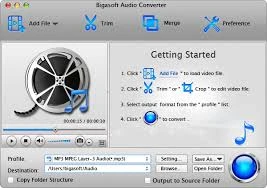
The installation process is rapidly completed. The interface is simple, allowing users to add items to the queue via the file browser, folder view, or drag-and-drop function. It is also possible to use YouTube video links.
The file list indicates the source format, duration, and size of each item. You can choose the output format and directory (original as source or different), instruct Bigasoft Audio Converter to copy the folder structure when encoding multiple items at once (i.e., batch processing), and adjust audio settings such as quality, codec, bit rate, sample rate, channel mode, and volume level.
Bigasoft Audio Converter also allows users to trim audio or video, preview clips in a built-in media player, capture frames, change the UI language, set the default output, and snapshot folder, provide a post-task action (e.g., exit), prevent system sleep during conversion, and more.
The software is light on computer resources, using only a small amount of CPU and RAM. It responds quickly, produces high-quality audio files, and functions properly without causing the operating system to hang, crash, or display error messages. Overall, Bigasoft Audio Converter should suit the needs of most consumers searching for easy-to-use audio conversion software. However, the pricing is expensive.