Ashampoo Photo Commander is a complete photo management and editing package that allows users to easily organize, improve, and show big image collections. It offers quick import, robust batch processing, and automatic correction features for fixing color, removing noise, and optimizing photographs without requiring time-consuming manual processes. With built-in templates for collages, slideshows, and web galleries, the tool addresses the widespread issue of managing and displaying hundreds or thousands of photographs on Windows PCs while preserving uniform quality and efficient workflows.
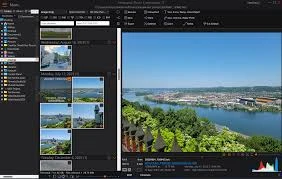
Key Features of Ashampoo Photo Commander:
- Duplicate Finder & Smart Search: Detects duplicate images with fingerprint technology and filters them by name, EXIF/IPTC metadata, or comments for easy library cleansing.
- Collages, Cards, and Frames: Using templates, create elegant collages and greeting cards by mixing images and text for quick, professional presentations or printed keepsakes.
- Crop and Advanced Editing: Enhance photographs with horizon straightening, perspective adjustment, gradation curves, and professional effects for high-quality results.
- Smart Image Viewer: Sort, group, and filter photos by date, location, or tags while previewing high-resolution images. Includes fast navigation and organizational options.
- Slideshow Creator with Music: Create high-resolution slideshows with transitions and background music, preview them instantaneously, and then export or burn the creations to disk.
- Auto-Enhance and Noise Reduction: Use advanced algorithms to auto-correct colors, decrease noise, and erase minor flaws across individual photographs or batches.
- Presentation Mode allows you to present photographs across several monitors with live modifications, making it suitable for projectors, client demos, and gallery-style viewing situations.
- Geotagging and Maps Integration: You can edit and create geotags, sort by location, and browse photo locations directly in Google Maps for convenient geographic organization.
- 200+ Photo Tool Collection: Access a comprehensive set of editing capabilities, effects, and utilities, ranging from fast adjustments to extensive post-processing workflows.
- Salvage, Restore, and Panorama Tools: Recover underexposed or damaged photographs, stitch panoramas, and use restoration techniques to bring imperfect images back to life.
- Batch Processing & Conversion: Convert formats, resize, watermark, and apply adjustments to big photo sets in a single operation to save time and maintain consistency.
- Fast Multi-Purpose Editing: With quick tools for cropping, cloning, focus effects, and tonal adjustments, users may polish photographs without switching between applications.
- Helpful Wizards and Guidance: Step-by-step wizards walk users through tasks such as calendar generation, collages, and bulk operations, allowing beginners to attain professional results.
Why Choose Ashampoo Photo Commander?
Ashampoo Photo Commander for Windows combines powerful editing features with user-friendly processes, making it excellent for photographers, hobbyists, and professionals alike. Its combination of sophisticated auto-correction, wide batch processing, and rich presentation features significantly minimizes time spent on repetitive activities while enhancing output quality. The program’s extensive toolkit and guided wizards enable users to easily create slideshows, collages, and web galleries without requiring significant setup. Overall, the software is stable, provides native 64-bit performance, and produces consistent results across big photo libraries.
Advantages of Ashampoo Photo Commander Portable Edition:
The portable edition works without installation and does not modify the Windows registry, allowing you to store the application and your preferences on a USB flash drive. Launch the software on many machines for on-site editing or client presentations without affecting host systems or leaving setup traces.