AnyTrans for iOS is a sophisticated and adaptable data management solution for those who desire complete control over their iPhone, iPad, and iPod content. Unlike previous synchronisation applications, it provides a cleaner, faster, and more user-friendly approach to transferring files across devices without relying on iTunes. Whether you want to transfer photographs, music, contacts, messages, or documents, AnyTrans makes everything orderly and straightforward.
One of the most powerful features of AnyTrans for iOS is its ability to link all of your digital sources—iOS devices, desktops, cloud drives, and even Android phones—in a single unified dashboard. This allows you to control files wherever they are stored and transfer them without any compatibility difficulties. The software automatically manages file conversions and keeps content organised across devices.
AnyTrans also improves the backup experience. Automatic wireless backup lets your device secretly create scheduled backups to your computer without a cable connection. Your personal information—photos, texts, app files, and contacts—is securely stored using advanced encryption. It’s a worry-free option for those seeking reliable security without manual effort.
AnyTrans offers a seamless migration experience for users who are upgrading to a new iPhone or transferring from Android. It transfers everything you need—memories, settings, programs, and files—so your new device feels familiar right away. AnyTrans for iOS is a sensible solution for anyone who desires complete flexibility and convenience when managing mobile data. It is fast, complete, and easy to use.
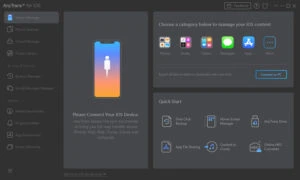
Features of AnyTrans for iOS.
Experience the most pleasant i-life that you have ever imagined.
Not only for your most critical personal data and media assets, but also to provide you with a more comfortable and delightful experience when using your iOS devices. You enjoy your i-Life, and AnyTrans will handle all the tedious management tasks. Everything you need to perform will be completed flawlessly with a single click, without any manual intervention.
Secure your vital data with automatic wireless backup.
Every iOS user should have an up-to-date backup, but making backups regularly is difficult – we understand. AnyTrans now takes up the difficult but necessary task. You do not need to do anything, including taking your iPhone out of your pocket. All of your images, messages, app data, and other vital files will be automatically, remotely, and securely backed up on your computer with your consent. Never worry about losing something crucial again.
Use iCloud Easily and Securely.
iCloud, the built-in partner of iOS devices, stores your vital data, though it can be difficult for most users to use. AnyTrans includes a user-friendly iCloud Manager to help you get the most out of iCloud. You can examine and extract what you need from iCloud backups with a straightforward UI, delete old files to free up valuable iCloud storage space, bulk download images to a computer, and more. The most powerful 256-bit encryption safeguards every access. Your privacy remains completely private.
Meet Old Memories on Your New iPhone.
Purchased a new iPhone? Warm it up with memories from your old phone. Whether you’re upgrading from an old iPhone or an Android phone, AnyTrans provides a more convenient, faster, and comprehensive data migration solution. All of your important files will be safely transferred, including photographs, music, contacts, and messages.
Move between iPhones.
AnyTrans offers several options to meet your unique needs. You can replicate all the content from the old iPhone to the new one with a single click, including custom settings like ringtones and backgrounds. Alternatively, you can move only the data you want, saving both time and iPhone storage. Merge material from several iOS devices to an iPhone without losing the original data. Feel free to personalise your new iPhone.
Switch from Android to iOS.
Surpassing Move to the iOS app in process and final output. AnyTrans enables a transition from Android to iOS that is considerably faster, safer, and more capable. With a single tap, you’ll have completed everything necessary in minutes. Additionally, you can easily select and transfer specific items as needed. There is no worry of compatibility issues. All data from Android phones will be translated to iOS-compatible formats on the fly.
System requirements
- OS: Windows 11, 10, 8, 7, Vista (both 32 and 64 bit)
- iOS: 13, 12, 11, 10, 9, 8, 7, 6, and 5
- Display resolution: 1024×768 or above.
- CPU: Pentium IV 2.4GHz or above.
- RAM: 512 MB system memory.
- Display Card: Accelerated 3D graphics with 64MB RAM.
- Sound Card: Windows-compatible sound card.
- Hard disk: 100 MB of hard drive space
- Others (iOS): iTunes 9.0 or later; the iTunes Mobile Device driver installed.