Rons Data Edit Pro is a professional CSV file editor for Windows. A modern tabular text editor that blends style, power, and usability. Rons Data Edit is a robust new CSV file editor for Windows. It can open any format of separated text (CSV, TSV, etc.) and gives you complete control over the content and structure. It is designed from the bottom up to properly provide both application control and data, making it perfect for data manipulation.
Whatever your requirements, this program is ideal for anyone who deals with tabular text files.
Are you ready to take control of your CSV files? Get Rons Data Edit Pro today! Experience a modern CSV editor that, unlike Excel, does not attempt to ‘assist’ with your data but instead gives a set of tools for working with the real text data.
Features of Ron’s Data Edit Pro
Clear control, elegant data.
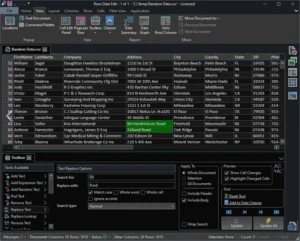
The program is presented cleanly, with easily discoverable features. Simple for first-time customers; more complicated options appear in logically organized panels, and experimentation is secure with full undo/redo.
The data grid allows for cell editing and has a straightforward structure that can be adjusted with features such as auto-scaling columns, column/row freeze, and multiline cells. Columns can be concealed and moved, and layouts stored for future use.
It’s All About Text (Opens Anything)
Profiles define sets of delimiters that can be linked to file extensions and/or copy-paste formats, allowing any separated text format (e.g., CSV, TSV, PSV, TAB, etc.) to be changed.
Auto-detect can be activated to recognize delimiters and combine with Profiles to ensure smooth file opening.
Full text encoding is supported, including UTF-7, UTF-8, UTF-16, and UTF-32, with automatic recognition.
Discover the Power.
Cell contents can be modified inline or in a separate editing window for long/multiline cells.
In addition to the basic editing choices, you can launch panels including the Toolbox, Columns Tools, Row Tools, and Cell Tools. These include capabilities such as row and column splitting/merging, duplicate/empty removal, and filling, to name a few.
Wherever possible, data is used in its’real’ format, such as sorting/filtering by numerical value, and multi-national support is provided throughout.
Lots of ways to get data in.
Aside from the ability to open any delimited text file, data can be imported from the clipboard, file, or web in any separated format, including JSON, XML, HTML, and tokens.
Imported data may be appended or joined to one or more row keys.
Lots of ways to get data out.
Of course, data can be exported to a file or clipboard in any separated format, including JSON, XML, HTML, and tokens.
You can export a file, view, or all open documents directly to Excel.
Slice and dice.
Build and store views from the main document to provide various insights.
Use Quick Filter and Filter to discover or organize rows.
Use Duplicate Rows to locate rows with matched values in one or more columns.
Construct a report in which clients create their own criteria.
Customers that want to see summaries of their data can do so with a Data Summary, as well as a Data Graph, which visualizes data using line charts, bar charts, and pie graphs.
Automation
Sets of editing rules known as Cleaners (shared with Ron’s Data Stream and accessible in a free Lite version) can also be used in Ron’s Data Edit to perform numerous editing operations on a document at once.
Cleaners employ some of the same ‘rules’ as the Toolbox, but they also encompass row and column operations.